Introduction
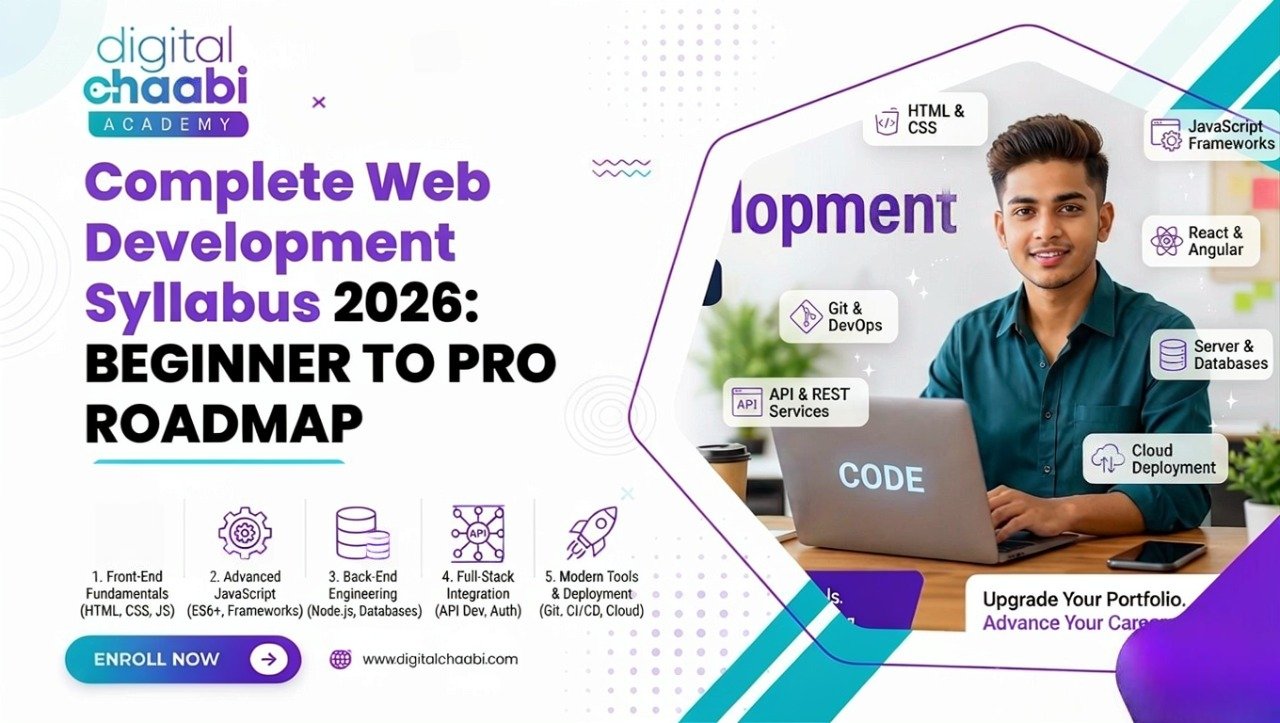
A web development syllabus gives you a structured path for learning how to build websites and web applications—from HTML and CSS to JavaScript, React, backend development, databases, APIs, Git, and deployment.
If you’re a beginner, the biggest challenge usually isn’t finding information. It’s knowing what to learn first, what to learn next, and what you can safely ignore for now.
There are thousands of tutorials, courses, videos, frameworks, and programming tools available. That can make web development feel much more complicated than it needs to be.
This guide breaks the web development syllabus for 2026 into a practical learning path. You’ll see the major topics, skills, tools, project stages, and technologies you should understand as you move from beginner to full stack development.
The goal isn’t to learn everything at once. The goal is to build one layer of knowledge on top of another.
Table of Contents
- What Is a Web Development Syllabus?
- Why Is a Web Development Syllabus Important?
- Full Stack Web Development Syllabus
- Web Development Roadmap 2026
- What Are the 7 Stages of Web Development?
- Web Development Course Syllabus
- Web Development Skills You Need
- Tools Used in Web Development
- Real-World Applications of Web Development
- Common Mistakes Beginners Make
- Step-by-Step Web Development Learning Plan
- Future Scope of Web Development in 2026
- Frequently Asked Questions
- Conclusion
What Is a Web Development Syllabus?
A web development syllabus is a structured learning plan that explains the topics, technologies, tools, and practical skills you need to learn to become a web developer.
Think of it like a building plan.
You don’t start by installing the roof before building the foundation. In the same way, learning React before understanding JavaScript can create unnecessary confusion.
A practical web development syllabus generally moves through these areas:
- Web fundamentals
- HTML
- CSS
- Responsive web design
- JavaScript
- Frontend frameworks and libraries
- Git and version control
- Backend development
- Databases
- APIs
- Authentication
- Testing and debugging
- Deployment and hosting
- Accessibility and performance
- Real-world projects
Modern learning resources also place strong emphasis on HTML, CSS, JavaScript, accessibility, responsive design, frameworks, and version control as core parts of the learning journey.
You don’t need to master everything immediately. The important thing is learning these topics in a sensible order.
Why Is a Web Development Syllabus Important?
Learning web development without a roadmap can quickly turn into tutorial hopping.
You watch one JavaScript course, then start React, then switch to Python, then try WordPress, then discover Node.js, and suddenly you’re familiar with dozens of technologies but can’t confidently build a complete project.
A structured syllabus helps you:
- Build strong fundamentals
- Understand how different technologies connect
- Practice skills in the right order
- Debug problems more confidently
- Build projects instead of only watching tutorials
- Prepare for interviews and freelance work
- Progress from frontend to full stack development
The fundamentals matter because modern frameworks build on the web platform rather than replacing it. MDN specifically recommends learning HTML, CSS, and JavaScript before moving into client-side frameworks.
Full Stack Web Development Syllabus
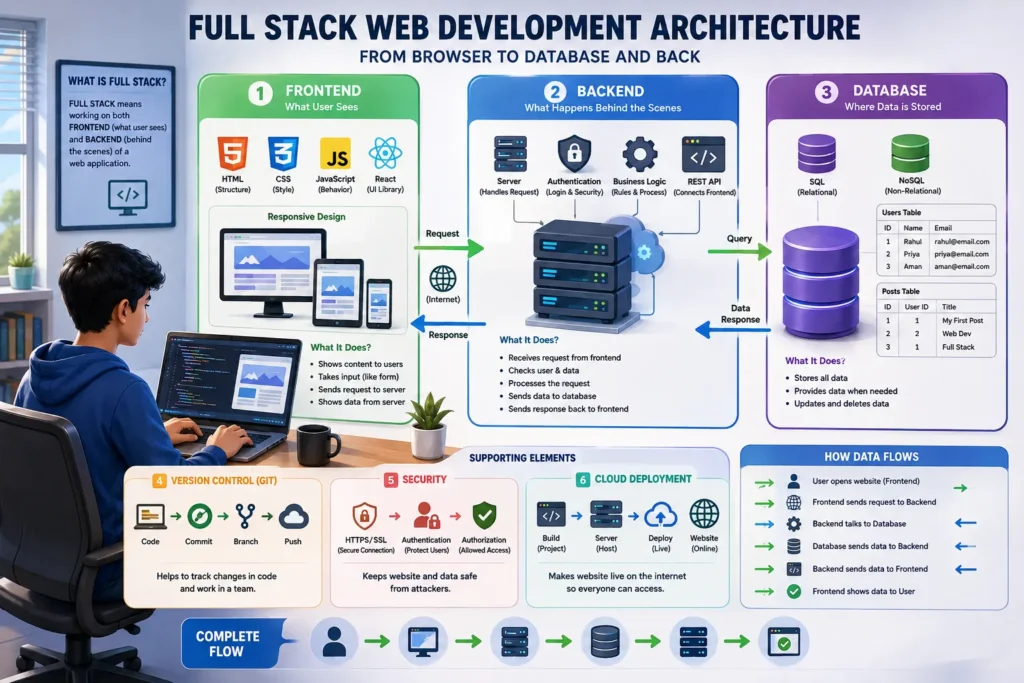
A full stack web development syllabus covers both the frontend and backend sides of web applications, along with the tools that connect them.
Frontend Development
Frontend development focuses on what users see and interact with.
You should learn:
- HTML
- Semantic HTML
- CSS
- CSS Flexbox
- CSS Grid
- Responsive design
- Mobile-first development
- JavaScript
- DOM manipulation
- Events
- Forms
- Fetching data
- Accessibility
- Frontend frameworks or libraries
HTML provides the structure of a webpage, CSS handles presentation and layout, and JavaScript adds interactivity.
Frontend Frameworks
After becoming comfortable with JavaScript, you can move into a framework or library such as React.
React is widely used for building component-based user interfaces, but the important point is to understand JavaScript and the underlying web platform first.
You can learn:
- Components
- Props
- State
- Events
- Conditional rendering
- Forms
- Routing
- Data fetching
- Component architecture
- Basic performance concepts
- Accessibility
Backend Development
Backend development handles the logic that runs behind the user interface.
Common topics include:
- Servers
- Routing
- Request and response handling
- Server-side programming
- Authentication
- Authorization
- APIs
- Database connections
- Error handling
- Security fundamentals
Popular backend choices include:
- Node.js with Express
- Python with Django or similar frameworks
- PHP and its modern frameworks
You don’t need to learn every backend language. Start with one stack and build projects with it.
Databases
A full stack developer also needs to understand how application data is stored and retrieved.
Common database technologies include:
- MySQL
- PostgreSQL
- MongoDB
- Other SQL and NoSQL systems
Important database concepts include:
- Tables and records
- Relationships
- Primary keys
- Queries
- CRUD operations
- Indexes
- Data validation
- Database security
- Connecting databases to applications
APIs
APIs allow different parts of an application to communicate.
You should understand:
- REST APIs
- HTTP methods
- GET, POST, PUT/PATCH, DELETE
- JSON
- Status codes
- Request headers
- Authentication
- API testing
Once you understand APIs, the connection between a frontend application and backend becomes much easier to understand.
Web Development Roadmap 2026
If you’re wondering what to learn first in web development, follow this sequence.
Stage 1: Learn Web Fundamentals
Start by understanding how the web works.
Learn the basics of:
- Browsers
- Websites
- Web servers
- Domains
- URLs
- HTTP and HTTPS
- Hosting
- Client and server concepts
You don’t need to become a networking expert at this stage.
You simply need enough understanding to know what happens when someone enters a website address into a browser.
Stage 2: Learn HTML
HTML is the foundation of webpage structure.
Focus on:
- HTML syntax
- Headings
- Paragraphs
- Links
- Images
- Lists
- Tables
- Forms
- Semantic HTML
- Page metadata
- Accessibility basics
Build several simple webpages before moving forward.
MDN’s beginner curriculum similarly starts with creating and structuring content using HTML before progressing to styling and interactivity.
Stage 3: Learn CSS
Once you can structure a page, learn how to make it look professional.
Important CSS topics include:
- Selectors
- Colors
- Typography
- Box model
- Spacing
- Positioning
- Flexbox
- CSS Grid
- Responsive design
- Media queries
- Transitions
- Basic animations
Pay particular attention to responsive design.
A website isn’t finished if it only looks good on a desktop screen.
Stage 4: Learn JavaScript
JavaScript adds behavior and interactivity to websites.
Start with:
- Variables
- Data types
- Operators
- Conditions
- Loops
- Functions
- Arrays
- Objects
- Events
- DOM manipulation
- Forms
- Error handling
- Asynchronous JavaScript
- Fetch API
- JSON
Then start building small projects.
For example:
- Calculator
- To-do application
- Quiz application
- Image gallery
- Weather application
- Simple expense tracker
MDN’s current learning curriculum includes JavaScript fundamentals such as variables, functions, events, DOM scripting, network requests, JSON, debugging, and error handling.
Stage 5: Learn Responsive Design and Accessibility
Modern websites need to work across different devices and be usable by people with different abilities.
Learn:
- Mobile-first design
- Media queries
- Flexible layouts
- Accessible HTML
- Keyboard navigation
- Form accessibility
- Alternative text
- Color and contrast basics
- ARIA when appropriate
Accessibility shouldn’t be treated as an optional final step. It should become part of how you build interfaces.
Stage 6: Learn Git and GitHub
Git is a version-control system that helps you track changes to your code.
Learn:
- Repositories
- Commits
- Branches
- Merging
- Pull requests
- Remote repositories
- Basic Git workflows
You should start using Git while building small projects rather than waiting until you’re working professionally.
Stage 7: Learn React or Another Frontend Framework
Once JavaScript feels comfortable, move into a frontend framework or library.
If you choose React, learn:
- Components
- JSX
- Props
- State
- Events
- Hooks
- Forms
- Conditional rendering
- Lists
- Routing
- API integration
- Component architecture
Don’t use React as a shortcut around JavaScript fundamentals.
Framework knowledge becomes much easier when you understand the language underneath it. MDN’s React learning material lists familiarity with HTML, CSS, and JavaScript as prerequisites.
Stage 8: Learn Backend Development
Now move behind the user interface.
Choose one backend stack and learn:
- Server setup
- Routing
- Middleware
- Request handling
- APIs
- Authentication
- Authorization
- Validation
- Error handling
- Security basics
For JavaScript developers, Node.js can be a practical choice because you can continue using JavaScript across the stack.
Stage 9: Learn Databases and APIs
Connect your backend to a database.
Practice:
- Creating data
- Reading data
- Updating data
- Deleting data
- Writing queries
- Designing relationships
- Connecting the database to your API
Then connect your frontend to the backend through APIs.
At this point, you should be able to understand the basic flow:
User → Frontend → API → Backend → Database → Backend → API → Frontend → User
Stage 10: Deploy a Real Project
The final step is putting your work online.
Learn the basics of:
- Hosting
- Environment variables
- Build processes
- Domains
- HTTPS
- Deployment
- Logs
- Basic monitoring
- Performance optimization
A project isn’t truly complete when it only runs on your laptop.
What Are the 7 Stages of Web Development?
The seven broad stages of web development are:
- Planning — Define the purpose, audience, features, and scope.
- Design — Create the structure, wireframes, and visual direction.
- Content Creation — Prepare text, images, videos, and other assets.
- Development — Build the frontend and backend.
- Testing — Check functionality, responsiveness, accessibility, and bugs.
- Deployment — Publish the website or application.
- Maintenance — Update content, fix issues, improve security, and maintain performance.
These stages are useful whether you’re building a small portfolio website or a larger web application.
A common beginner mistake is focusing almost entirely on coding while ignoring planning, testing, deployment, and maintenance.
Web Development Course Syllabus
A typical web development course syllabus can be divided into the following modules.
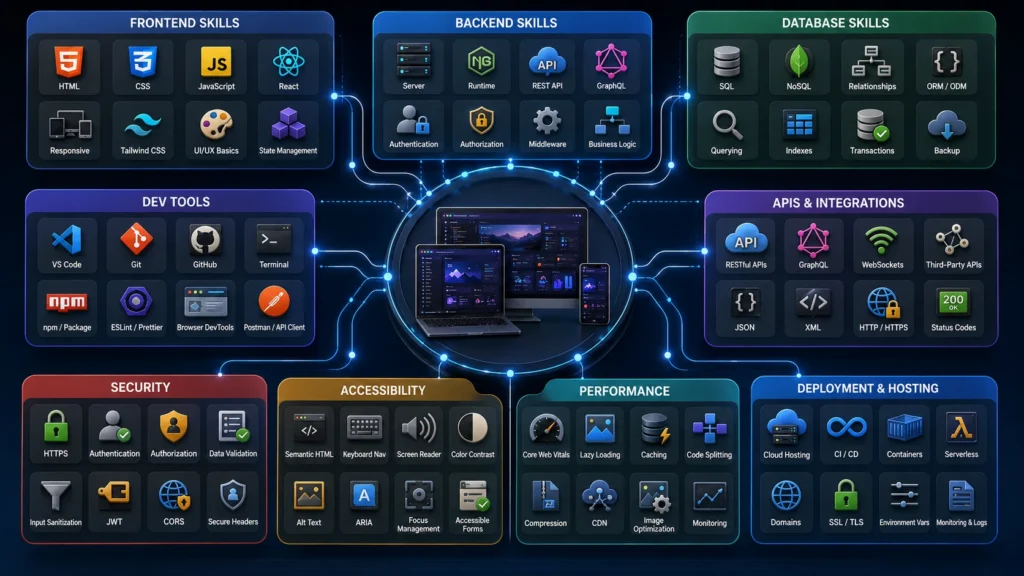
Module 1: Introduction to Web Development
- How the web works
- Browsers and servers
- Domains
- Hosting
- Development environment
- Code editors
- Browser DevTools
Module 2: HTML
- HTML structure
- Semantic elements
- Headings
- Links
- Images
- Lists
- Tables
- Forms
- Metadata
Module 3: CSS
- Selectors
- Box model
- Typography
- Colors
- Flexbox
- Grid
- Responsive design
- Media queries
Module 4: JavaScript
- Variables
- Functions
- Arrays
- Objects
- Conditions
- Loops
- Events
- DOM
- Fetch
- JSON
- Error handling
Module 5: Frontend Framework
- React or another suitable framework
- Components
- State
- Props
- Events
- Routing
- API integration
Module 6: Git and Version Control
- Git basics
- Branches
- Commits
- GitHub
- Collaboration workflows
Module 7: Backend Development
- Servers
- Routing
- APIs
- Authentication
- Validation
- Security fundamentals
Module 8: Databases
- SQL or NoSQL concepts
- CRUD
- Queries
- Relationships
- Database integration
Module 9: Deployment
- Hosting
- Environment variables
- Domain setup
- HTTPS
- Production deployment
Module 10: Final Project
The course should finish with a real project that combines multiple skills instead of another isolated tutorial.
Web Development Skills You Need
Frontend Skills
A frontend developer should understand:
- Semantic HTML
- CSS
- Flexbox
- Grid
- Responsive design
- JavaScript
- DOM manipulation
- Forms
- Accessibility
- Components
- API integration
Backend Skills
Backend development requires knowledge of:
- Server-side programming
- Routing
- APIs
- Databases
- Authentication
- Authorization
- Validation
- Error handling
- Security
Supporting Skills
Don’t overlook:
- Git
- Debugging
- Browser DevTools
- Documentation
- Problem-solving
- Communication
- Project planning
- Basic performance optimization
MDN’s current curriculum also treats environment knowledge, accessibility, responsive design, version control, and soft skills as meaningful parts of becoming an effective web developer.
Tools Used in Web Development
You don’t need every development tool available.
Start with a small, practical toolkit.
Code Editor
VS Code is a common choice for writing and managing code.
Browser DevTools
Use browser developer tools to:
- Inspect HTML
- Test CSS
- Debug JavaScript
- Check network requests
- Investigate performance issues
Git and GitHub
Use Git for version control and GitHub or another Git hosting service for remote repositories and collaboration.
API Testing Tools
Tools such as Postman or similar API clients can help you test requests before connecting an API to your frontend.
Package Managers
Depending on your stack, you may work with tools such as npm or other package managers.
Design Tools
Basic familiarity with tools such as Figma can help when translating designs into real interfaces.
The exact tools can change over time. The underlying concepts are more important than becoming dependent on one particular tool.
Real-World Applications of Web Development
Learning web development can open several practical paths.
Freelancing
You can build:
- Business websites
- Landing pages
- Portfolio websites
- Custom web applications
- Website improvements
Agency Work
Digital agencies often need people who understand websites, design, development, SEO, performance, and conversion-focused experiences.
E-commerce
Web development skills can help with:
- Shopify customization
- WooCommerce customization
- Product pages
- Landing pages
- Custom integrations
Internal Business Tools
Companies use web applications for:
- Dashboards
- CRM systems
- Reporting tools
- Employee portals
- Workflow applications
Conversion Rate Optimization
If you understand HTML, CSS, JavaScript, and user experience, you can make more informed improvements to existing websites.
Common Mistakes Beginners Make
1. Learning React Too Early
React is useful, but jumping into it before understanding JavaScript can make simple concepts unnecessarily difficult.
2. Tutorial Hopping
Watching five tutorials about the same topic isn’t the same as practicing it.
Choose one structured learning path and complete projects.
3. Skipping Projects
Watching someone build a website doesn’t give you the same experience as building one yourself.
4. Ignoring Responsive Design
Always test your projects on different screen sizes.
5. Avoiding Git
Git may feel unnecessary for your first small project, but learning it early makes your workflow much easier later.
6. Trying to Learn Everything
You don’t need React, Vue, Angular, Node.js, Python, PHP, three databases, and five cloud platforms at the same time.
Choose one path.
7. Ignoring Accessibility
Accessible websites are easier for more people to use and accessibility is an important part of modern frontend development.
Step-by-Step Web Development Learning Plan
Here’s a practical sequence you can follow.
- Learn how websites and browsers work.
- Learn HTML and semantic structure.
- Learn CSS fundamentals.
- Master Flexbox and CSS Grid.
- Learn responsive design.
- Build 3–4 HTML/CSS projects.
- Learn JavaScript fundamentals.
- Learn DOM manipulation and events.
- Build interactive JavaScript projects.
- Learn Git and GitHub.
- Learn a frontend framework such as React.
- Rebuild one previous project using components.
- Learn backend fundamentals.
- Build REST APIs.
- Learn a database.
- Connect your database to your backend.
- Connect your frontend to your API.
- Add authentication and validation.
- Build one complete full stack project.
- Deploy the project online.
- Improve accessibility, performance, and security.
- Add the project to your portfolio.
The key is to build while learning.
MDN’s current beginner pathway also emphasizes building and publishing a first website rather than treating web development as purely theoretical study.
Future Scope of Web Development in 2026
Web development continues to evolve, but the fundamentals remain important.
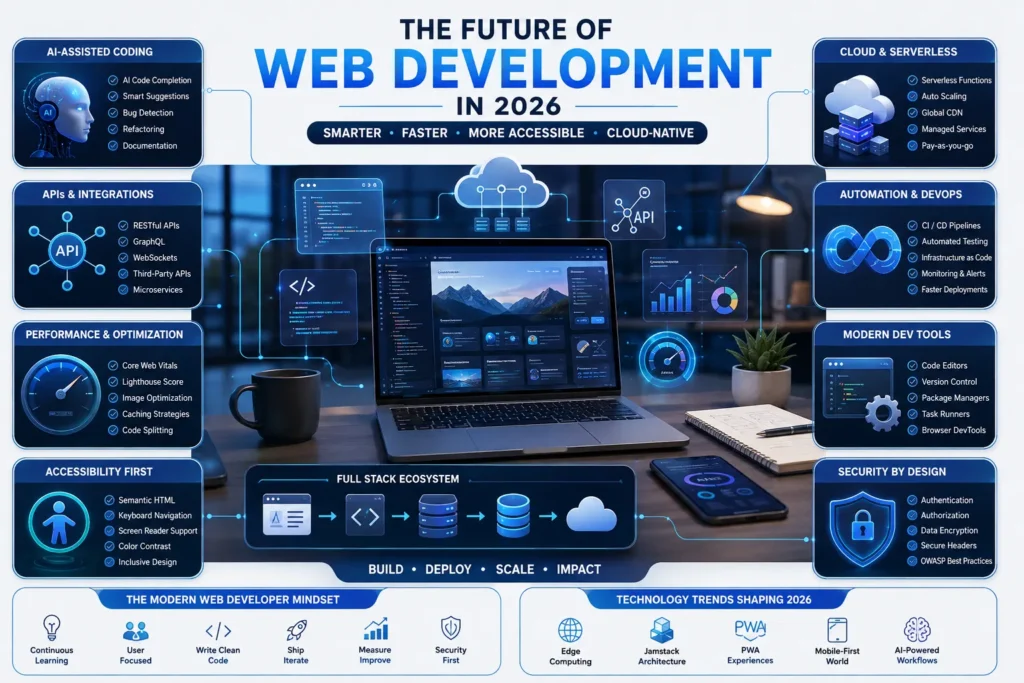
AI-assisted development is changing how developers write and review code. Developers can use AI tools to speed up repetitive tasks, explore ideas, generate drafts, and troubleshoot problems.
That doesn’t remove the need to understand HTML, CSS, JavaScript, APIs, databases, security, accessibility, and performance.
In fact, understanding the fundamentals becomes even more useful when you’re reviewing AI-generated code.
Other areas worth watching include:
- AI-powered web applications
- API integrations
- Serverless architectures
- Edge computing
- Web performance
- Accessibility
- Progressive web experiences
- Headless CMS platforms
- Automation
- Full stack development
Performance and accessibility are especially important for modern websites. A good developer shouldn’t only ask whether a website works; they should also ask whether it is fast, accessible, responsive, maintainable, and useful.
Frequently Asked Questions
What should I learn first in web development?
Start with web fundamentals, then HTML, CSS, and JavaScript. After you understand the core technologies, move into responsive design, Git, frontend frameworks, backend development, databases, APIs, and deployment.
How long does it take to learn web development?
There is no fixed timeline because it depends on your starting point, available study time, practice habits, and project goals.
Someone studying consistently for several hours a day can progress much faster than someone studying occasionally.
Focus less on a specific number of months and more on whether you can independently build and deploy projects.
Which language should I learn first for web development?
HTML and CSS should come first because they provide the structure and styling of webpages. JavaScript should follow because it adds programming logic and interactivity.
Once your JavaScript foundation is strong, you can move into a framework or library.
Is web development still worth learning in 2026?
Yes, but the skill set is changing.
Developers increasingly work with APIs, AI tools, cloud platforms, frameworks, automation, and performance-focused workflows.
The best approach is to combine strong web fundamentals with modern tools rather than learning tools without understanding the underlying technology.
Do I need a computer science degree to become a web developer?
A degree can be useful for some career paths, but it isn’t the only way to learn web development.
Self-learning, structured courses, bootcamps, practical projects, internships, and freelance work can all help you build relevant skills.
Your portfolio and ability to solve real problems can demonstrate what you can actually do.
What’s the difference between frontend and backend development?
Frontend development focuses on what users see and interact with in the browser.
Backend development handles server-side logic, databases, authentication, APIs, and other processes that happen behind the interface.
A full stack developer works across both areas.
Should I learn frontend or backend first?
For most beginners, frontend is the easier starting point because you can immediately see the results of your code.
Start with HTML, CSS, and JavaScript, then move into backend development once you’re comfortable building interactive interfaces.
Is React necessary for web development?
No.
React is a popular choice for building modern interfaces, but it isn’t a requirement for becoming a web developer.
You should understand HTML, CSS, and JavaScript first. Then choose a framework or library based on your goals and the type of projects you want to build.
What projects should I build while learning web development?
Start small and gradually increase complexity.
Good beginner projects include:
- Personal portfolio
- Landing page
- Calculator
- To-do application
- Quiz application
- Weather application
- Blog
- Expense tracker
- Product catalog
- Full stack CRUD application
The best project is one that forces you to use the skills you’re currently learning.
Conclusion
A web development syllabus isn’t a list of technologies you need to memorize.
It’s a sequence.
Start with the fundamentals. Learn HTML and CSS. Add JavaScript. Build projects. Learn responsive design and accessibility. Introduce Git. Then move into React or another frontend framework, backend development, databases, APIs, and deployment.
Don’t try to learn everything simultaneously.
Build something after every major stage.
A simple website you actually built will teach you more than another ten hours of passive tutorials. As your projects become more complex, the individual pieces of the web development syllabus start connecting naturally.
The goal isn’t to become an expert in every technology.
The goal is to become capable of understanding a problem, choosing the right tools, building a solution, testing it, and putting it in front of real users.
That’s what turns a learner into a web developer.
Recommended Learning Resources
For deeper technical learning, MDN Web Docs provides structured learning material covering HTML, CSS, JavaScript, web APIs, accessibility, performance, and frontend frameworks.