Your ads are running. Clicks are coming in. The budget is going out. But are the conversions actually being counted? Many advertisers can’t answer that with confidence. The dashboard shows two leads, but the owner got five calls. Or it shows ten purchases, but the sales sheet shows six. When tracking is broken, every decision built on those numbers is a guess.
Conversion Tracking Training teaches you how to fix that. You learn to set up Google Tag Manager, create tags and triggers, record form fills, calls, and purchases, connect them to Google Ads, Meta Ads, and analytics, and then verify that the data is correct. The best programmes make you set up and test tracking on real websites, so you finish with working skills instead of screenshots.
This matters because paid campaigns without tracking are like driving at night with the headlights off. You’re moving, but you can’t see where.
If you’re a marketer, freelancer, student, or business owner who wants numbers you can trust, this guide covers what the training includes, how long it takes, and how to start.
What Is Conversion Tracking Training?
A conversion is any action you want a visitor to take: a form submission, a phone call click, a WhatsApp chat, a booking, or a purchase. Conversion tracking is how you count those actions and tell your ad platforms about them.

Conversion Tracking Training is a structured programme where you learn to set that system up properly. You start with how tracking works, move into Google Tag Manager and event setup, and finish with testing, debugging, and reporting.
A good programme usually covers:
- What conversions, events, tags, triggers, and variables are
- Google Tag Manager setup and workspace basics
- Google Analytics 4 events and conversions
- Google Ads conversion tracking
- Meta Pixel and conversion events
- Testing, debugging, and fixing broken tags
- Consent, privacy, and clean reporting
Most ad courses teach campaign building and mention tracking in one lesson. Conversion Tracking Training gives it the full attention it needs, because every optimisation depends on it.
The good news? You don’t need to be a developer. You need patience, a methodical mind, and a willingness to test everything twice.
Why This Skill Pays Off
Ask any experienced media buyer what causes the most confusion in ad accounts. Many will say the same thing: tracking that was never set up properly.
That’s the gap. Here’s why people choose this skill:
- Everyone needs it. Any business running paid ads or analytics depends on accurate data.
- It’s a rare skill. Many advertisers can build campaigns but struggle with tags and triggers.
- It directly protects budgets. Wrong data leads to wrong decisions, and wrong decisions waste money.
- It pairs with everything. PPC, SEO, web design, and funnels all improve when tracking is solid.
Picture a clinic running ads for appointment bookings. The ads send people to a page with a form. Nobody set up tracking on the thank-you page, so the ad platform thinks nothing is working. It keeps showing ads to the wrong people.
Someone trained in tracking fixes that in an afternoon. That’s the kind of value Conversion Tracking Training builds. To be clear, no course can promise income. What it gives you is a skill that businesses regularly struggle to find.
Want to see how a real tracking setup is tested? Ask for a live demo of tag testing before joining any Conversion Tracking Training programme.
What Does Conversion Tracking Training Include?
Before paying for any course, ask one question: will I set up and test tracking on real websites, or only watch someone click through menus?
A complete Conversion Tracking Training programme should include these modules:
- Tracking fundamentals: how data moves from a visitor’s click to your reports.
- Google Tag Manager basics: containers, workspaces, tags, triggers, and variables.
- Event planning: deciding which actions matter before building anything.
- Form and button tracking: capturing submissions, clicks, calls, and WhatsApp taps.
- E-commerce tracking: product views, add-to-cart, and purchase events.
- Platform connections: sending conversions to Google Analytics 4, Google Ads, and Meta.
- Testing and debugging: preview mode, debug tools, and platform checks.
- Consent and privacy basics: respecting user choices and platform rules.
- Documentation and reporting: keeping a clean record of what’s tracked and why.
The planning module is the one beginners skip. They start building tags before deciding what actually counts as a success. Then they track everything and understand nothing.
A strong programme also teaches you to document your work. A tracking plan saves hours when something breaks six months later.
Conversion Tracking Training at a Glance: GTM, Tags and Paid Campaign Setup
Short on time? Here’s the quick view.
- Best for: beginners, PPC executives, freelancers, web designers, analysts, and business owners.
- Skills learned: tag setup, trigger logic, event tracking, platform connections, testing, debugging, and documentation.
- Tools used: Google Tag Manager, Google Analytics 4, Google Ads, Meta Events Manager, and browser debugging tools.
- Typical duration: around 3 to 6 weeks for beginners, depending on practice hours.
- Prerequisites: basic understanding of websites and digital ads helps, but isn’t mandatory.
- Outcome: a fully tested tracking setup and a documented tracking plan you can show clients.
When you compare any Conversion Tracking Training option, ask five things. Do you work on real sites? Is testing taught properly? Are both Google and Meta covered? Do you learn to document? Do you get feedback on your setup?
If two or more answers are no, keep looking.
Does Google Tag Manager Track Conversions?
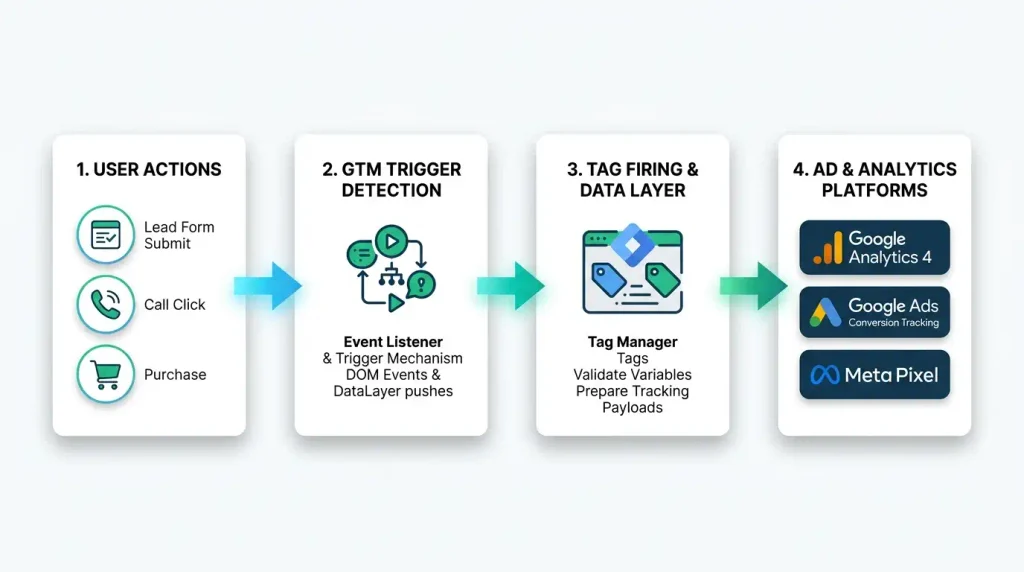
Google Tag Manager does not track conversions by itself. It is a container that lets you add and manage tags, such as Google Ads conversion tags or GA4 events, without editing site code each time. The tracking happens only when you configure the right tags and triggers inside it.
This confuses many beginners. They install the Tag Manager code and assume tracking has begun. It hasn’t. The container is empty until you fill it.
Here’s how it works in simple terms:
- Tag: the piece of code that sends data, such as a conversion signal to Google Ads.
- Trigger: the rule that decides when the tag fires, such as a click on a button.
- Variable: extra information the tag or trigger uses, such as a page URL or a purchase value.
So a conversion setup usually looks like this: a visitor submits a form, a trigger detects it, a tag fires, and the ad platform receives the signal.
If any one of those three is wrong, the conversion is missed. That’s why careful Conversion Tracking Training spends so much time on testing, not just on building.
How to Check Google Conversion Tracking?
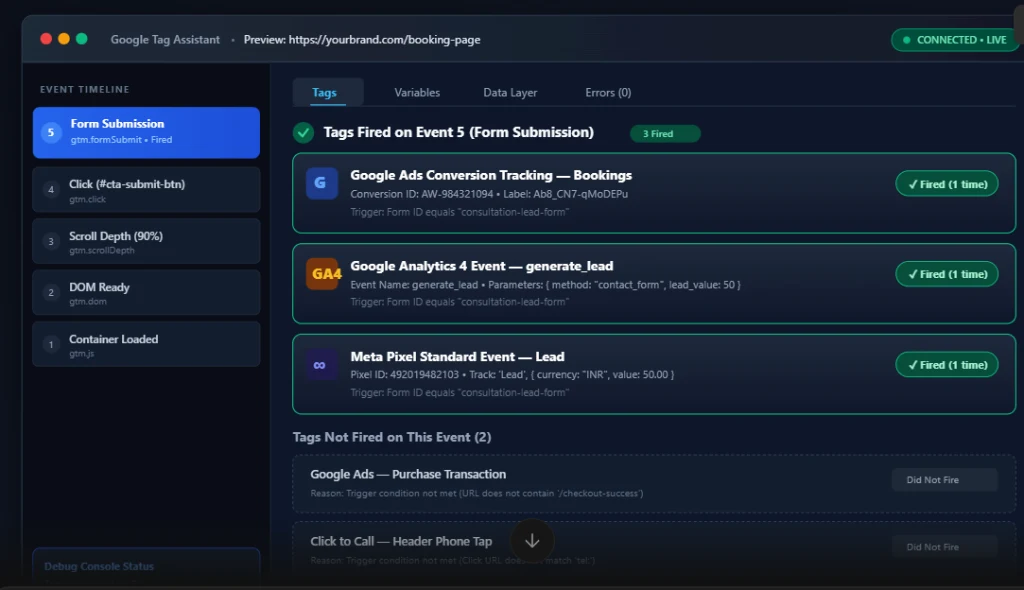
Check Google conversion tracking by testing the action yourself while using Tag Manager’s preview mode or Tag Assistant, confirming that the tag fires, then checking the conversion status in Google Ads and the events in Google Analytics. Allow some time for data to appear in reports.
Here’s a simple verification routine:
- Open preview mode. In Google Tag Manager, start preview and load your site.
- Perform the action. Submit the form, click the button, or complete a test purchase.
- Confirm the tag fired. Check that the correct tag appears under fired tags for that event.
- Check the details. Make sure values like conversion ID or event name are correct.
- Check Google Analytics. Use the real-time or debug view to see the event arrive.
- Check Google Ads. Look at the conversion action status and whether it records conversions.
- Test on mobile. Many visitors arrive on phones, so test there too.
- Re-check after changes. Site updates and redesigns often break tags.
Notice that testing happens at every layer. A tag can fire correctly and still fail to register in the platform because of a wrong ID or a consent setting.
Reporting delays are also normal, so don’t panic if numbers don’t appear instantly. But if nothing shows after a reasonable time, go back through the steps above.
This is the exact routine practised in Conversion Tracking Training, repeated until it becomes second nature.
Want to practise debugging on real tags? Choose Conversion Tracking Training that teaches you to find problems, not just build setups.
Skills You Build in Conversion Tracking Training
Tools change their menus often. Skills are what you keep.
Measurement Planning
You learn to decide what counts as a conversion before touching any tool. Calls, forms, chats, and purchases don’t all carry the same value, and good planning reflects that.
Tag Manager Skills
You learn to create tags, write trigger rules, and use variables. You also learn to organise a container so it stays readable as it grows.
At Digital Chaabi Academy, learners practise this by setting up and debugging tracking on real pages and reviewing each setup with a mentor, which turns menu knowledge into real troubleshooting ability.
Platform Integration Skills
You connect Tag Manager to Google Analytics 4, Google Ads, and Meta. You learn how each platform receives events and what makes them accept or reject data.
Testing and Debugging Skills
This is where beginners become professionals. You learn to trace a missing conversion step by step: was the trigger wrong, the tag misconfigured, or the platform not receiving it?
Documentation and Communication
You learn to write a tracking plan and explain it to a client in plain language. Clients don’t want a list of tag names. They want to know what is being measured and whether they can trust it.
The best Conversion Tracking Training programmes blend all five, because tracking fails if any one layer is weak.
Where You Can Use These Skills
Skills matter only when they turn into work. Here’s where they do:
- Freelancing: tracking audits and setups for small businesses running ads.
- Agency roles: PPC executive, analytics specialist, or tracking and tagging assistant.
- In-house marketing: keeping a company’s data accurate across ad platforms.
- E-commerce: purchase and funnel tracking across product pages and checkout.
- Lead generation: form, call, and chat tracking for clinics, education, and services.
- Web design projects: adding tracking at launch so clients start with clean data.
Take an online store that spends heavily on ads but sees mismatched sales numbers. After Conversion Tracking Training, you can audit the setup, find duplicate or missing purchase events, and restore trustworthy reporting.
Common Mistakes Beginners Make
Most beginners don’t fail because tracking is too technical. They fail because of these habits:
- Installing the container and stopping. An empty container tracks nothing.
- Tracking everything. More events don’t mean better insight. Focus on actions that matter.
- Skipping testing. A tag that looks right in the setup may not fire in the real world.
- Counting duplicates. Double-firing tags inflate conversions and mislead optimisation.
- Forgetting mobile. Test on phones, not only on a desktop.
- Ignoring consent and privacy. Follow platform rules and respect user choices.
- Leaving no documentation. Future you, or the next person, will have no idea what was built.
- Choosing theory-only learning. Conversion Tracking Training without live debugging leaves you with definitions but no confidence.
Fix these early and you’ll be ahead of most people starting out.
Step-by-Step Roadmap to Start Conversion Tracking Training
Here’s a simple path. No fluff.
- Pick your goal. Freelancing, a job, or fixing your own campaigns.
- Learn the basics. Understand events, conversions, and how ad platforms use them.
- Create a practice container. Install Google Tag Manager on a test site.
- Build your first tag. Start with a simple page-view or button-click event.
- Track a form submission. Use a thank-you page or a form event trigger.
- Connect GA4 and Google Ads. Send the same action to each platform.
- Test and debug. Use preview mode, check every layer, and fix what breaks.
- Document the setup. Write a simple tracking plan and keep it with your portfolio.
Follow the order. Accuracy beats speed.
Future Scope
Tracking is changing. Privacy rules, browser restrictions, and consent requirements are making data collection more complicated, not less.
That raises the value of people who understand it properly. Platforms are adding more automation and modelling, but they still depend on correct signals from your site. If the input is wrong, the automation optimises the wrong thing.
AI tools can explain terms and suggest setups, but they can’t open your container, see what actually fires, or notice that a tag is counting twice.
Stack this skill with paid ads, landing page design, or SEO and you can manage a project from the first click to the final sale. Conversion Tracking Training is a strong base for building those extra skills.
FAQs
Q: What is Google Tag Manager tracking?
A: Google Tag Manager itself doesn’t track anything. It is a tool that loads and manages tags on a website. The tracking depends on which tags you add, such as GA4 events or ad conversion tags. Conversion Tracking Training teaches you to configure those tags and triggers correctly.
Q: Why is Google Tag Manager.com trying to track me?
A: Websites use Tag Manager to load their own analytics and advertising tags, so the tracking is set up by the site owner, not by Google Tag Manager itself. You can control this through browser privacy settings, tracking protection, and the site’s consent options, where available.
Q: Do I need coding for Conversion Tracking Training?
A: Not to begin. Most setups use Tag Manager’s visual interface. A little HTML, CSS, and JavaScript knowledge helps for advanced cases, such as custom triggers, but many practical projects can be handled without writing code. Start with the basics and build gradually.
Q: How long does Conversion Tracking Training take?
A: Most beginners need around 3 to 6 weeks with regular practice. The exact time depends on how many setups you build and test. Rushing through menus without debugging real tags leaves gaps, so focus on completing and verifying full tracking setups.
Q: Is Google Analytics 4 the same as Google Tag Manager?
A: No. Google Analytics 4 collects and reports data about visitor behaviour, while Google Tag Manager manages the tags that send data to tools like GA4. They work together. A good Conversion Tracking Training programme teaches both, plus how they connect to ad platforms.
Q: Can I earn after completing Conversion Tracking Training?
A: Many people use this skill for freelancing, agency roles, or in-house marketing work. Results depend on your portfolio, how you pitch, and consistency. There are no guarantees, but documented, tested setups give you a real advantage when approaching clients.
Conclusion
Ad platforms can only optimise what they can see. When tracking is wrong, they optimise the wrong thing, and the budget quietly pays for it.
The path is simple. Plan what matters, build tags carefully, test at every layer, and document your work. That’s what separates people who “added a pixel” from people who get hired to make data trustworthy.
If you want that outcome, choose Conversion Tracking Training that makes you build, test, and debug real setups. Skip the one that only walks through menus.
Ready to Set Up and Verify Tracking for Paid Campaigns?
If you’re serious about measuring ad results properly instead of trusting numbers that might be wrong, Conversion Tracking Training at Digital Chaabi Academy lets you set up Google Tag Manager, connect Google and Meta, and test every conversion with mentor feedback. Start your next batch and learn to make every ad rupee measurable.