Introduction
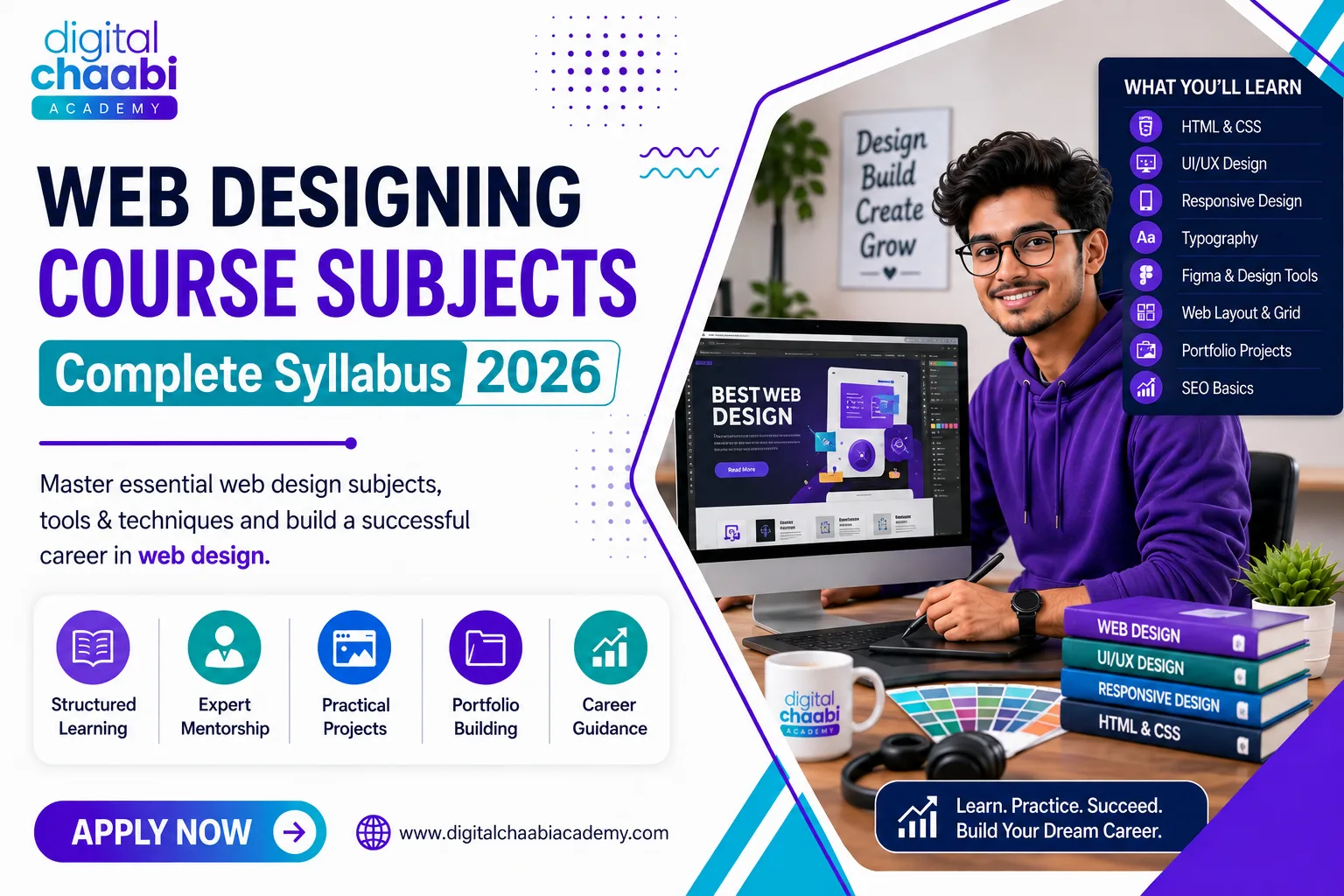
Learning web design in 2026 requires more than knowing how to make a website look attractive. Beginners now need a practical combination of HTML and CSS fundamentals, UI/UX principles, responsive design, Figma, basic JavaScript awareness, and familiarity with modern AI-assisted tools.
The good news is that you don’t need to master everything at once. A structured learning path can take you from basic visual design and website structure to responsive layouts, real-world projects, and career-ready skills.
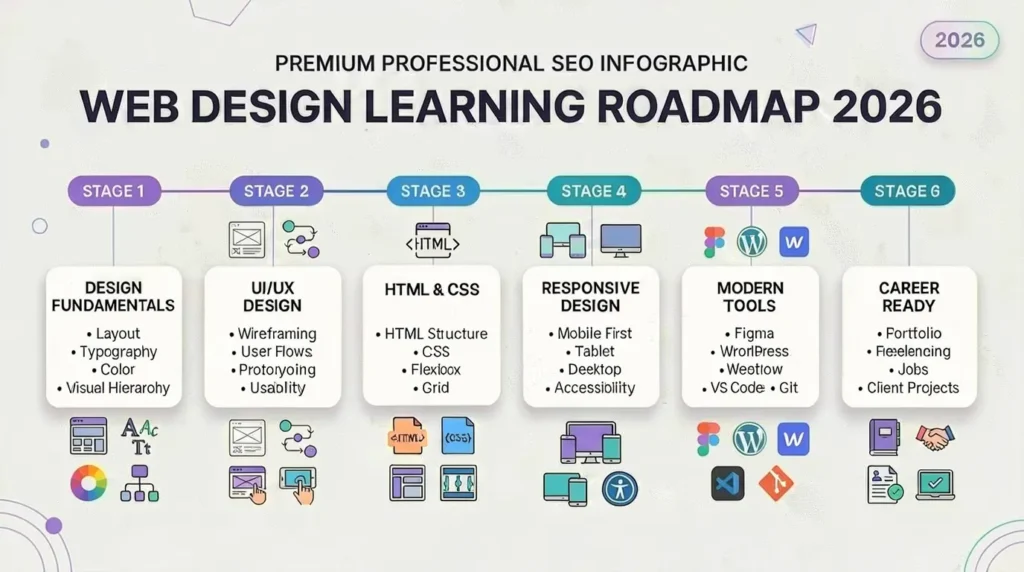
In this guide, you’ll discover what skills you need to learn web design, which tools matter in 2026, how long it takes to become job-ready, what career opportunities are available, and which trends are shaping the future of web design.
Table of Contents
- What Is Web Design and What Does Learning It Involve in 2026?
- Is Web Design Still a Good Career in 2026?
- What Skills Do You Need to Learn Web Design?
- Essential Web Design Tools to Learn in 2026
- Is Web Development a Good Skill to Learn in 2026?
- How AI Is Changing Web Design in 2026
- Digital Chaabi Academy Insights
- What Are the Best Online Skills to Learn in 2026?
- Career Opportunities After Learning Web Design
- Common Mistakes Beginners Make While Learning Web Design
- How Long Does It Take to Learn Web Design in 2026?
- Web Design Learning Roadmap for Beginners
- Future Trends in Web Design
- Frequently Asked Questions
- Conclusion
What Is Web Design and What Does Learning It Involve in 2026?
Web design is the process of planning and creating the visual appearance, structure, usability, and overall user experience of a website.
There’s a common misconception that web design is purely visual work—choosing colors, selecting fonts, and arranging elements. Those things matter, but effective web design involves much more.
Learning web design in 2026 involves:
- Understanding user behavior and expectations
- Creating clear website layouts and navigation
- Applying typography, spacing, color, and visual hierarchy
- Designing for mobile, tablet, and desktop screens
- Understanding basic HTML and CSS
- Creating interfaces and prototypes with tools such as Figma
- Working with developers on technical requirements
- Considering accessibility and usability
- Understanding basic SEO and website performance
- Using AI tools responsibly to improve the design workflow
Modern web designers therefore need a combination of creative, technical, analytical, and communication skills.
The tools will continue to change, but the fundamental goal remains the same: create websites that are easy to understand, easy to use, visually consistent, and useful to the people visiting them.
Is Web Design Still a Good Career in 2026?
Yes, web design remains a viable career in 2026 for people who are willing to continuously improve their skills and adapt to changing technology.
Businesses, startups, agencies, creators, and organizations continue to need websites, landing pages, online stores, digital products, and user-friendly online experiences.
However, the role of a web designer is evolving.
Knowing only how to create attractive layouts may not be enough for competitive opportunities. Designers who understand UI/UX, responsive design, basic coding, SEO, accessibility, and modern AI-assisted workflows can offer more value.
Career paths can include:
- Full-time web designer
- UI/UX designer
- Freelance web designer
- WordPress designer
- Webflow specialist
- Landing-page designer
- Digital design specialist
- Design and marketing specialist
One of the biggest advantages is flexibility. You can work for a company, join an agency, freelance for clients, or eventually build your own design business.
What Skills Do You Need to Learn Web Design?
If you’re wondering what skills are needed for web design, focus on a combination of design fundamentals, technical knowledge, and professional skills.
1. Visual Design Skills
Start with the fundamentals:
- Layout
- Spacing
- Alignment
- Typography
- Color theory
- Visual hierarchy
- Composition
- Consistency
These principles are more important than simply knowing how to use a particular software tool.
2. UI/UX Design
UI refers to the interface users interact with, while UX focuses on how effectively and comfortably they experience the product.
You should understand:
- User flows
- Wireframing
- Prototyping
- Navigation
- Information architecture
- Usability
- User-centered design
- Basic user research
3. HTML and CSS
You don’t necessarily need to become a professional developer, but basic HTML and CSS are highly valuable for web designers.
HTML helps you understand website structure, while CSS controls presentation and layout.
Important concepts include:
- HTML elements
- Semantic HTML
- CSS selectors
- Box model
- Flexbox
- CSS Grid
- Responsive layouts
- Media queries
4. Responsive Web Design
Websites need to work across different screen sizes.
Learn how to design for:
- Mobile phones
- Tablets
- Laptops
- Desktop monitors
Mobile-first thinking is particularly important because many users access websites primarily through mobile devices.
5. Basic JavaScript Awareness
A designer doesn’t always need advanced JavaScript skills, but understanding the basics can help you communicate with developers and design realistic interactions.
You should understand concepts such as:
- Buttons and interactions
- Forms
- Menus
- Modals
- Dynamic content
- Basic event behavior
6. Basic SEO Knowledge
Web design and SEO increasingly overlap.
A designer should understand the basics of:
- Website structure
- Heading hierarchy
- Image optimization
- Internal linking
- Mobile usability
- Page speed
- Accessibility
- Search-friendly content structure
7. Communication Skills
Technical ability isn’t enough when working with clients or development teams.
You also need:
- Clear communication
- Presentation skills
- Ability to explain design decisions
- Feedback management
- Time management
- Client understanding
- Problem-solving
Essential Web Design Tools to Learn in 2026
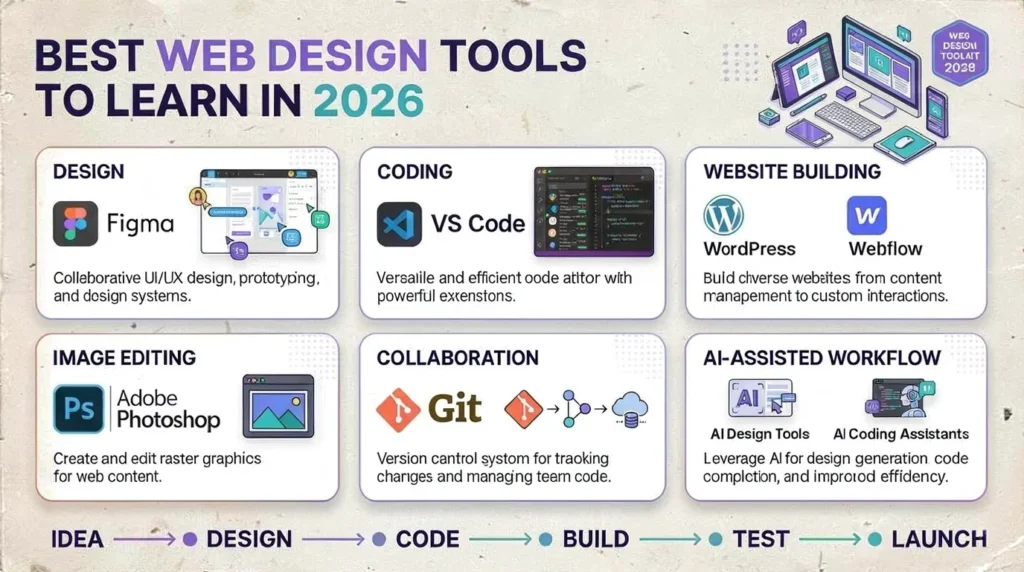
Tools can make the design process faster, but they don’t replace design fundamentals.
Figma
Figma is one of the most important tools for modern UI design, wireframing, prototyping, and design systems.
Learn:
- Frames
- Components
- Auto Layout
- Prototypes
- Variables
- Design systems
- Responsive design concepts
VS Code
VS Code is useful for practicing HTML and CSS and understanding how designs translate into real website code.
WordPress
WordPress is useful for designers who want to create websites for businesses, blogs, portfolios, and other projects without building everything from scratch.
Webflow
Webflow combines visual design with website development concepts and can be useful for designers who want more control over the final website.
Adobe Photoshop
Photoshop remains useful for image editing, graphics, photo manipulation, and creating visual assets.
Git
Basic Git knowledge is useful when collaborating with developers and working with version-controlled projects.
AI-Assisted Design Tools
AI is increasingly becoming part of the design workflow.
Designers can use AI for:
- Brainstorming
- Layout ideas
- Content suggestions
- Image generation
- Rapid prototypes
- Design variations
- Research assistance
- Code assistance
However, AI-generated output should always be reviewed for usability, accessibility, accuracy, brand consistency, and visual quality.
Is Web Development a Good Skill to Learn in 2026?
Yes. Web development remains a valuable skill to learn in 2026, particularly when combined with web design.
You don’t have to become a full-stack developer to benefit from development knowledge.
Even basic development skills can help you:
- Understand technical limitations
- Communicate better with developers
- Build simple websites yourself
- Create more realistic prototypes
- Estimate project complexity
- Take on more freelance projects
A designer who understands both design and basic development can often communicate ideas more effectively and take greater ownership of a project.
How AI Is Changing Web Design in 2026
AI is changing how designers approach research, ideation, content, prototyping, and implementation.
Instead of viewing AI as a replacement for design knowledge, beginners should learn how to use it as a productivity tool.
AI can help with:
- Generating initial layout ideas
- Brainstorming website sections
- Creating content variations
- Generating visual concepts
- Exploring design directions
- Summarizing research
- Assisting with HTML and CSS
- Identifying possible accessibility issues
- Creating faster design iterations
But there is an important limitation.
AI can produce something that looks impressive while still being difficult to use.
A professional designer needs to evaluate:
- Is the navigation clear?
- Is the hierarchy logical?
- Is the content understandable?
- Does the interface work on mobile?
- Is it accessible?
- Does it match the brand?
- Does the design support the business objective?
The best approach in 2026 is therefore AI-assisted design rather than AI-dependent design.
Digital Chaabi Academy Insights
At Digital Chaabi Academy, we believe learning web design should go beyond watching tutorials or memorizing software features.
A practical learning process should combine design fundamentals with real projects and modern tools.
Common beginner challenges include:
- Learning tools without understanding design principles
- Focusing too heavily on templates
- Avoiding HTML and CSS
- Creating small practice files instead of complete projects
- Building portfolios without realistic briefs
- Using AI-generated designs without reviewing usability
- Learning without receiving meaningful feedback
That’s why practical projects, feedback, and real-world design problems are important parts of becoming a capable web designer.
Students who understand both design fundamentals and basic development concepts can also create more complete solutions for clients.
What Are the Best Online Skills to Learn in 2026?
Some of the most useful online skills to learn in 2026 include:
- Web design
- Web development
- UI/UX design
- Digital marketing
- SEO
- Content writing
- Video editing
- AI tool literacy
- Data analysis
- Social media marketing
For someone interested in web design, learning one complementary skill can significantly increase career flexibility.
Web Design + Digital Marketing
Helps you understand conversions, audiences, campaigns, and landing pages.
Web Design + SEO
Helps you create websites that are both user-friendly and search-friendly.
Web Design + Content Writing
Helps you create complete website experiences rather than focusing only on visuals.
Web Design + Development
Allows you to understand both the design and implementation sides of a website.
Career Opportunities After Learning Web Design
After learning web design, you can explore several career directions.
In-House Web Designer
Work directly for a company, startup, educational organization, or other business.
Freelance Web Designer
Work with multiple clients and create websites, landing pages, portfolios, and online stores.
UI/UX Designer
Move deeper into user research, interface design, prototyping, and product experiences.
WordPress Designer
Build and customize websites using WordPress and related tools.
Webflow Specialist
Create visually designed websites using Webflow.
Design + Marketing Specialist
Combine website design with SEO, digital marketing, landing-page optimization, and content.
If you’re starting from zero, explore our Web Design for Beginners guide before moving into more advanced concepts.
You can also learn more about the benefits of web design training and explore our guide on how to start freelancing as you build your skills.
Common Mistakes Beginners Make While Learning Web Design
1. Focusing Too Much on Tools
Knowing every Figma feature won’t help if your design lacks hierarchy, consistency, or usability.
2. Ignoring HTML and CSS
Even basic coding knowledge can make you a better designer.
3. Watching Tutorials Without Building Projects
Tutorials are useful, but complete projects demonstrate whether you can actually apply what you’ve learned.
4. Building Only Visually Attractive Designs
A beautiful website can still have poor navigation, confusing content, or accessibility problems.
5. Avoiding AI Completely
You don’t need to use every AI tool, but understanding how AI fits into modern workflows is increasingly useful.
6. Using AI Without Human Review
AI output can contain usability, accessibility, content, and design problems. Always review the final result.
7. Learning Without Feedback
An experienced designer can identify problems that beginners often overlook.
How Long Does It Take to Learn Web Design in 2026?
The time required depends on your starting point, consistency, project quality, and learning method.
A realistic progression for a beginner could look like this:
| Learning Stage | Approximate Time | Main Focus |
|---|---|---|
| Foundation | 1 month | Design principles and UI basics |
| Basic web skills | 1–2 months | HTML, CSS and responsive design |
| Tool proficiency | 2–3 months | Figma and website builders |
| Project development | 3–4 months | Complete website projects |
| Career preparation | 4–6 months | Portfolio, clients and job preparation |
Many beginners can develop foundational skills within 2–3 months of consistent practice. Reaching a stronger freelance or entry-level level can take around 4–6 months, depending on the amount of practical work and feedback.
The important point is that learning web design is not a race. Your portfolio and ability to solve real design problems matter more than simply completing a course.
Web Design Learning Roadmap for Beginners
If you’re completely new to web design, avoid trying to learn every tool at the same time.
Follow a structured progression.
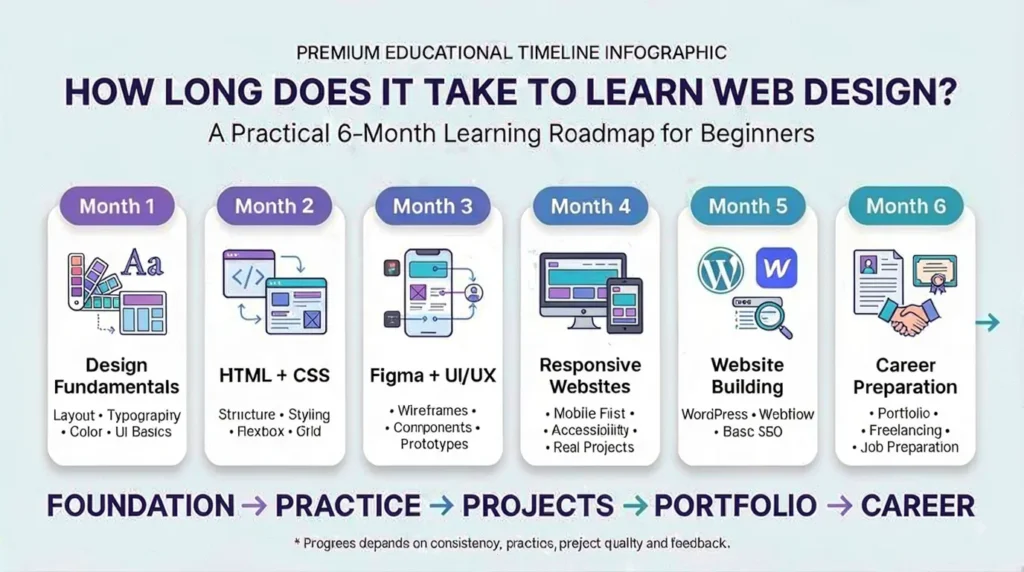
Month 1: Learn Design Fundamentals
Start with:
- Layout
- Spacing
- Typography
- Color theory
- Visual hierarchy
- Basic UI/UX
- Wireframing
Your goal is to understand why a design works, not just how to reproduce it.
Month 2: Learn HTML, CSS and Responsive Design
Focus on:
- HTML structure
- CSS fundamentals
- Flexbox
- CSS Grid
- Responsive layouts
- Mobile-first design
- Basic accessibility
Build simple pages instead of only watching tutorials.
Month 3: Learn Figma and Build Projects
Practice:
- Wireframes
- High-fidelity designs
- Components
- Prototypes
- Design systems
- Responsive UI concepts
Create complete projects such as:
- Business website
- Landing page
- Portfolio website
- E-commerce homepage
- Service website
Months 4–6: Build Career-Ready Skills
Add:
- WordPress or Webflow
- Basic JavaScript awareness
- Basic SEO
- Client communication
- Project management
- Portfolio development
- Freelancing fundamentals
- AI-assisted design workflows
At this stage, focus less on collecting certificates and more on demonstrating what you can actually create.
Web Design Skills at a Glance
| Skill | Priority | Why It Matters |
|---|---|---|
| HTML | High | Website structure |
| CSS | High | Styling and layouts |
| Responsive Design | High | Mobile and desktop usability |
| Figma | High | UI design and prototyping |
| UI/UX | High | Better user experiences |
| JavaScript | Medium | Understanding interactions |
| WordPress | Medium | Building real websites |
| Webflow | Medium | Visual website development |
| SEO | Medium | Search visibility |
| AI Tools | Medium | Faster modern workflows |
| Git | Low–Medium | Collaboration and version control |
Future Trends in Web Design
Several trends are likely to continue influencing web design through 2026 and beyond.
AI-Assisted Workflows
AI will increasingly support research, ideation, prototyping, content creation, and implementation.
Accessibility
Designers are paying greater attention to accessible interfaces that work for people with different abilities and needs.
Mobile-First Design
Designing for smaller screens first remains important as mobile devices continue to play a major role in web usage.
Website Performance
Fast-loading websites provide a better user experience and can support stronger search performance.
Design Systems
Reusable components and consistent design systems help teams create and maintain websites more efficiently.
No-Code and Low-Code Tools
Platforms such as WordPress and Webflow allow designers to take more responsibility for building and launching websites.
Human-Centered Design
As AI makes visual production faster, understanding users, business goals, usability, and accessibility becomes even more valuable.
For reliable information about search and website best practices, resources such as Google Search Central, MDN Web Docs, W3C, and web.dev are useful starting points.
Frequently Asked Questions About Learning Web Design
Is web design still a good career in 2026?
Yes. Web design remains a viable career for people who combine strong design fundamentals with UI/UX knowledge, responsive design, basic coding, communication skills, and familiarity with modern tools.
What skills are needed for web design?
Important skills include visual design, UI/UX principles, HTML, CSS, responsive design, Figma, basic JavaScript awareness, SEO fundamentals, accessibility, and communication.
Is web development a good skill to learn in 2026?
Yes. Web development is a valuable complementary skill for designers because it improves technical understanding and makes it easier to collaborate with developers or build simple websites independently.
What are the best online skills to learn in 2026?
Web design, web development, UI/UX, digital marketing, SEO, content creation, and AI tool literacy are useful skills. Combining two related skills can create additional career opportunities.
Do I need to learn coding to become a web designer?
You don’t need advanced programming skills to become a web designer, but learning basic HTML and CSS is highly recommended. It helps you understand how designs are implemented and communicate more effectively with developers.
Can I learn web design without a degree?
Yes. A degree isn’t the only path into web design. A strong portfolio, practical projects, relevant skills, and the ability to solve real design problems can be valuable when pursuing freelance or entry-level opportunities.
What is the best way to start learning web design?
Start with design fundamentals, then learn HTML and CSS, responsive design, Figma, UI/UX principles, and basic website-building tools. Build complete projects throughout the process rather than relying only on tutorials.
How long does it take to learn web design in 2026?
Many beginners can develop foundational skills within 2–3 months of consistent practice. Reaching a stronger freelance or entry-level level commonly takes around 4–6 months, depending on practice, project quality, and feedback.
Conclusion
Learning web design in 2026 looks different from a few years ago. AI tools are becoming part of everyday workflows, website-building platforms are becoming more capable, and designers increasingly benefit from technical and strategic knowledge.
However, the fundamentals haven’t changed.
You still need to understand users, create clear information structures, apply visual hierarchy, design responsive interfaces, and solve real problems.
Start with the fundamentals. Learn HTML and CSS. Become comfortable with Figma. Build complete projects. Learn basic SEO and accessibility. Explore AI tools without becoming dependent on them.
Most importantly, build a portfolio that demonstrates what you can actually do.
If you want to learn web design the way it is practiced in 2026—with design fundamentals, practical projects, modern tools, AI literacy, and mentorship—Digital Chaabi Academy can help you develop the skills needed to move from beginner practice toward real-world web design work.