
Web design
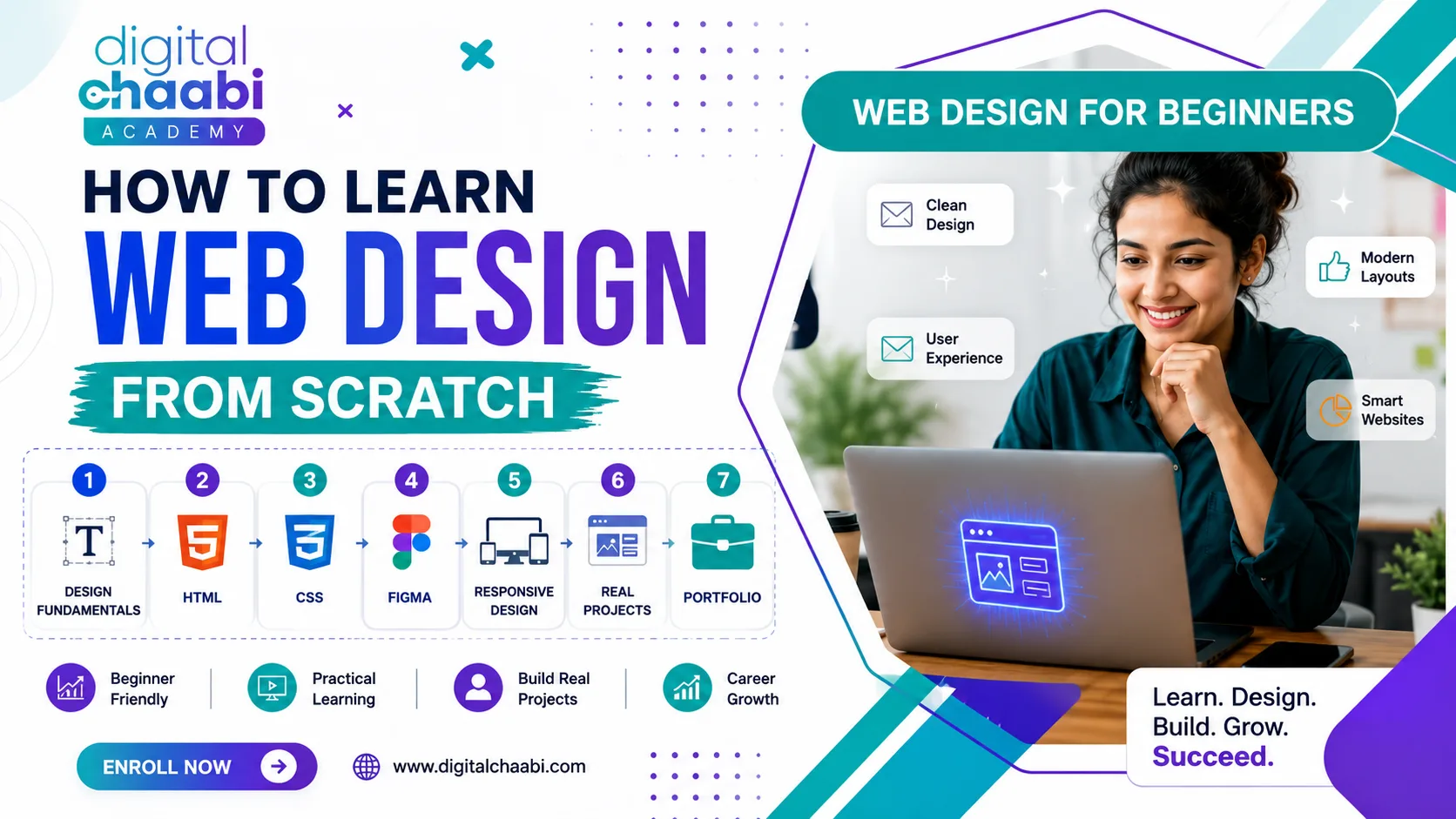
If you’re wondering how to learn web design from scratch, the best approach is to follow a clear sequence instead of jumping between random tutorials. Start with basic visual design principles such as layout, spacing and hierarchy. Then learn HTML and CSS, practice with a design tool such as Figma, and gradually build real projects. With consistent practice, many beginners can create a simple, styled webpage within 4 to 8 weeks.
The problem most beginners face isn’t a lack of information. There’s already an enormous amount of free content available online. The real problem is knowing what to learn first, what to learn next, and when to start building projects. You might learn some Figma today, watch an HTML tutorial tomorrow, try WordPress next week and then jump into JavaScript. After a few weeks, you may know a little about several tools without actually knowing how to create a complete website. That’s why this guide follows a simple learning path. You’ll learn what web design actually involves, which skills and tools to learn first, how HTML and CSS fit into the process, how to build your first project, how long learning can take, and what to do after you understand the fundamentals.
What Is Web Design?
Before learning how to learn web design, it’s important to understand what web design actually means. Web design is the process of planning and creating how a website looks, feels and guides visitors toward an action. It includes visual elements such as layout, typography, colors, spacing, images and navigation, but effective web design is about more than making a page look attractive. A good website should answer three basic questions:
- What is this page about?
- Who is it designed for?
- What should the visitor do next?
Colors, fonts, images and spacing should support those goals rather than exist simply for decoration. For beginners, this distinction is important because learning web design isn’t just about learning software. You also need to understand why a particular design works.
How to Learn Web Design for Beginners
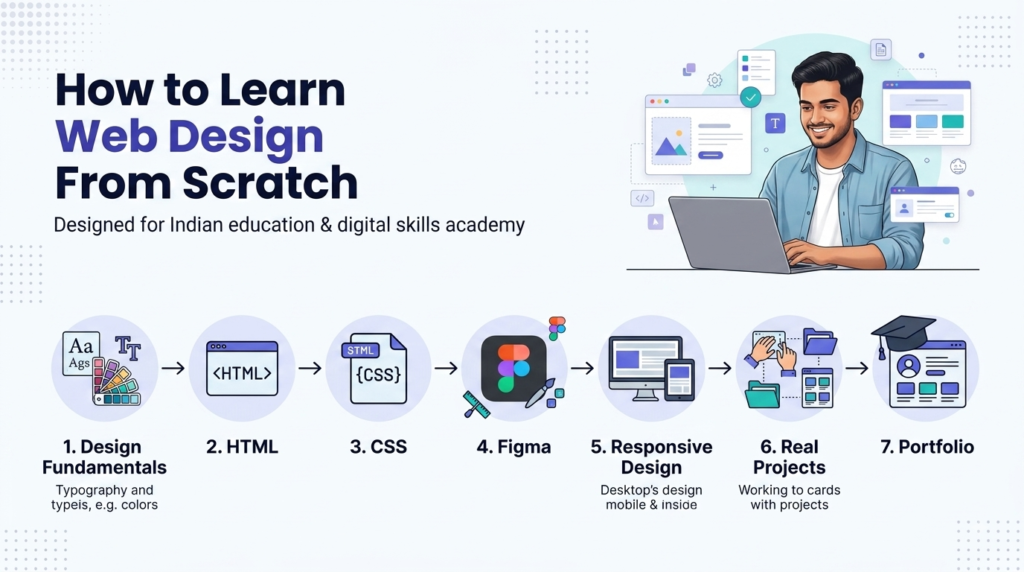
The most reliable way to learn web design as a beginner is to follow a fixed order: Design fundamentals → HTML/CSS → Figma → responsive design → projects → feedback → portfolio. This approach gives each new skill a purpose.
Start With Layout and Visual Hierarchy
Before worrying about advanced software, understand:
- Layout
- Spacing
- Alignment
- Contrast
- Typography
- Color
- Visual hierarchy
- White space
These fundamentals help you understand why some websites feel easy to use while others feel confusing.
Learn Basic HTML and CSS
You don’t need to become an advanced developer to start learning web design. However, basic HTML and CSS knowledge can help you understand how a visual design becomes a real webpage.
Start with:
- HTML headings
- Paragraphs
- Links
- Images
- Lists
- Forms
- CSS colors
- Fonts
- Margins
- Padding
- Borders
- Basic layouts
- Flexbox
Learn One Design Tool
Choose one primary design tool instead of constantly switching between applications. Figma is a practical starting point for beginners because it can be used for wireframes, layouts and website mockups.
Study Existing Websites
Don’t just browse websites. Study them. Ask yourself:
- Why is the main heading placed here?
- Why is the button a particular size?
- How is the page divided into sections?
- Where does my eye go first?
- Is the navigation easy to understand?
- What happens when I view the page on a smaller screen?
This develops design thinking rather than just software knowledge.
Start Building Small Projects
Don’t wait until you feel completely ready. Build simple projects while learning. Your first project doesn’t need to be impressive. It needs to teach you something.
Get Feedback and Improve
Share your work with a mentor, friend, community or other learners. Find something that doesn’t work, improve it and repeat the process. That feedback loop is where much of the practical learning happens.
Can I Learn Web Design by Myself?
Yes, you can learn web design by yourself. Free tutorials, documentation, design tools and practice projects provide enough resources to get started without paying for a course. Self-learning works best when you have:
- A fixed daily or weekly schedule
- One structured learning resource at a time
- Small projects to practice each skill
- A way to receive feedback
- Patience to repeat difficult concepts
The biggest challenge with self-learning is usually not access to information. It’s structure and accountability. If you spend several days stuck on the same problem without knowing what to do next, a structured course or mentor can help you move forward faster. A useful approach is to combine self-learning with practical projects rather than watching tutorials without building anything.
What You Need Before Starting Web Design
The barrier to starting web design is relatively low. You don’t need expensive equipment or paid software to learn the fundamentals.
1. A Laptop or Desktop
A basic modern computer is enough for learning HTML, CSS, Figma and beginner-level web design.
2. A Code Editor
Visual Studio Code is a practical choice for writing HTML and CSS.
3. A Modern Web Browser
Chrome or Firefox can be used for testing websites and accessing developer tools.
4. A Design Tool
Figma’s free tier can cover many beginner design requirements.
5. Consistent Practice Time
Even 1–2 hours of focused practice per day can be more useful than spending six hours learning only once a week. Consistency matters more than occasional long study sessions.
Step-by-Step Web Design Learning Path
If you’re starting from zero, follow these steps in order.
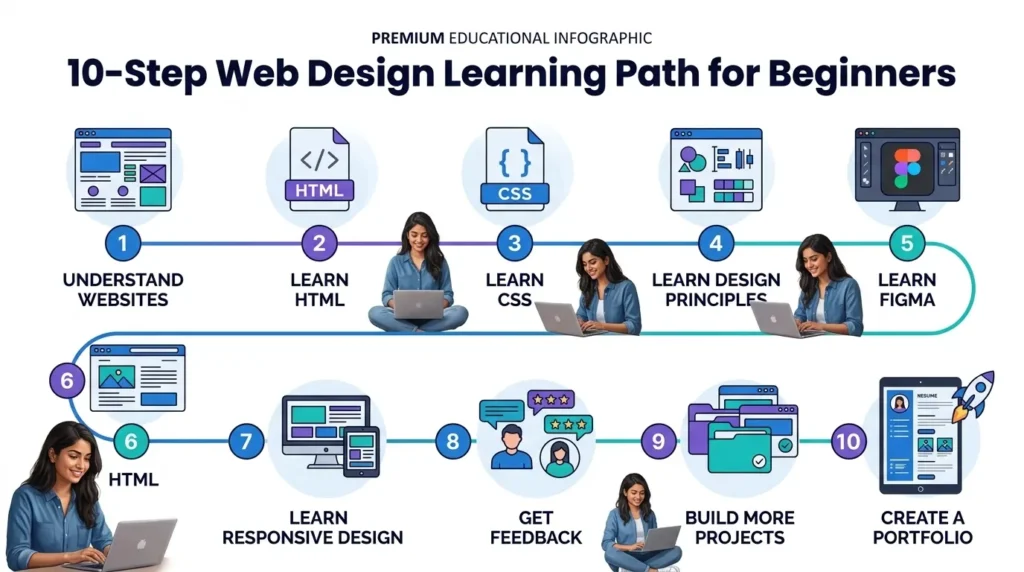
Step 1: Understand How Websites Work
Spend a day or two learning basic concepts such as:
- What a website is
- What a browser does
- What a domain is
- How webpages load
- What HTML and CSS do
You don’t need technical depth yet. The goal is to understand the basic environment.
Step 2: Learn HTML
HTML provides the structure of a webpage. Start with:
- Headings
- Paragraphs
- Links
- Images
- Lists
- Buttons
- Forms
- Semantic elements
Build simple pages as you learn each concept.
Step 3: Learn CSS
CSS controls how your HTML content looks. Start with:
- Colors
- Fonts
- Backgrounds
- Spacing
- Borders
- Width and height
- Positioning
- Flexbox
- Basic responsive styling
Don’t try to memorize everything. Practice writing CSS repeatedly until common properties become familiar.
Step 4: Learn Visual Design Principles
Now connect coding with design. Study:
- Contrast
- Alignment
- Typography
- Whitespace
- Visual hierarchy
- Color combinations
- Consistency
This is where your websites begin to look intentional rather than simply functional.
Step 5: Learn Figma
Use Figma to create and study website layouts. Start by recreating two or three existing website designs for practice. Focus on:
- Frames
- Components
- Typography
- Spacing
- Buttons
- Cards
- Navigation
- Responsive layouts
The goal isn’t to copy another designer’s work for publication. The goal is to understand how professional layouts are constructed.
Step 6: Build Your First Static Website
Create a simple personal portfolio or business webpage using HTML and CSS. Keep the project small. For example:
- Header
- Hero section
- About section
- Services or skills
- Projects
- Contact section
- Footer
Step 7: Learn Responsive Web Design
A website shouldn’t only look good on a desktop. Learn how layouts change across:
- Mobile
- Tablet
- Desktop
Test your projects at different screen widths.
Step 8: Get Feedback
Show your project to someone else. Ask:
- Is the page easy to understand?
- Is the navigation clear?
- Is the main action obvious?
- Does anything look confusing?
- Does the mobile layout work properly?
Then revise your design.
Step 9: Build More Projects
Build at least two or three additional projects with different purposes. For example:
- Landing page
- Small business website
- Event website
- Personal portfolio
- Product page
Different projects expose you to different design problems.
Step 10: Create a Portfolio
Once you have several projects, organize your best work into a simple portfolio website. Your portfolio becomes evidence of what you can actually do.
Can I Learn HTML in 7 Days?
Yes, you can learn the basics of HTML in 7 days, especially if you practice every day. Within a week, a beginner can become familiar with concepts such as:
- HTML document structure
- Headings
- Paragraphs
- Links
- Images
- Lists
- Tables
- Forms
- Basic semantic elements
However, seven days isn’t enough to become completely comfortable using HTML in real projects. Think of it like learning to type. You can understand where the keys are relatively quickly, but typing comfortably without constantly thinking about every key takes practice. The same applies to HTML. Use the first week to understand the fundamentals, then keep building pages until the syntax becomes familiar.
What Are the 7 Steps to Web Design?
The 7 common steps to web design are:
- Define the purpose and goals
- Plan the website structure
- Create wireframes
- Develop the visual design
- Prepare the content
- Develop the website
- Test and launch
1. Define the Purpose
First determine what the website needs to achieve. Is it designed to:
- Generate leads?
- Sell products?
- Provide information?
- Build a portfolio?
- Promote a service?
2. Plan the Website Structure
Determine which pages are needed and how visitors will move between them.
3. Create Wireframes
Wireframes are basic layouts that show where content and interface elements will go.
4. Develop the Visual Design
Apply:
- Colors
- Typography
- Images
- Buttons
- Spacing
- Branding
5. Prepare the Content
Add the actual:
- Text
- Images
- Videos
- Product information
- Calls to action
6. Develop the Website
Turn the design into a working webpage using HTML, CSS and other appropriate technologies.
7. Test and Launch
Check the website across different devices and browsers before making it publicly available. Many beginner tutorials focus heavily on development while overlooking the planning and design stages. Understanding the complete process gives you a stronger foundation.
Web Design Tools Every Beginner Should Know
You don’t need dozens of tools to start learning web design. A small toolkit is enough.
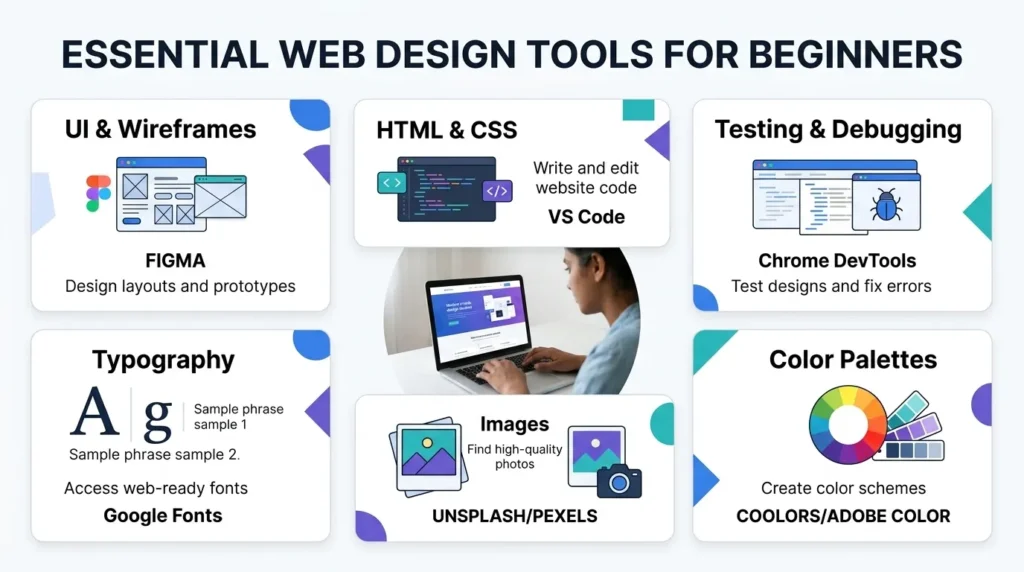
Figma
Useful for:
- Wireframes
- Website mockups
- UI design
- Layout practice
- Prototypes
Visual Studio Code
Useful for writing and editing HTML and CSS.
Chrome DevTools
Useful for:
- Inspecting webpages
- Testing layouts
- Debugging CSS
- Checking responsive behavior
Google Fonts
A useful source of fonts for website projects.
Unsplash and Pexels
Useful sources of images for practice projects.
Coolors and Adobe Color
Useful for experimenting with color palettes. The important thing is not how many tools you know. It’s how effectively you can use a small number of tools to complete a project.
Digital Chaabi Academy Insights
At Digital Chaabi Academy, we often see a common pattern among beginners who have already tried learning web design themselves. They may know a little Figma, some HTML and perhaps a website builder, but they don’t always understand how those skills connect inside a complete project. A structured learning approach can help fill that gap. The focus is on connecting design fundamentals with practical website creation, responsive design, real project briefs and feedback. Students who have already explored web design independently may also find structured learning easier because they already understand some of the basic terminology and concepts. The goal should not be to collect certificates or memorize tools. The goal should be to build a skill you can demonstrate through real work.
How to Build Your First Web Design Project
Once you understand the basics, start a project with a clear purpose. Don’t create a random collection of sections just to practice code. Instead, choose a simple scenario.
Beginner Project Ideas
1. Personal Portfolio
Create a website showing:
- About section
- Skills
- Projects
- Contact information
2. Small Business Website
Create a fictional website for:
- Bakery
- Gym
- Local shop
- Restaurant
- Service business
3. Event Landing Page
Create a single-page website containing:
- Event information
- Date and location
- Benefits
- Registration form
- Call-to-action button
4. Website Recreation
Choose an existing website and recreate its layout purely as a learning exercise. The purpose at this stage isn’t originality. It’s learning how to apply:
- Layout
- Hierarchy
- Spacing
- Typography
- Responsive design
- HTML
- CSS
After completing your project, test it on both desktop and mobile screens.
Common Web Design Mistakes Beginners Make While They Learn Web Design
1. Constantly Switching Tools
Moving between Figma, Canva, different website builders and multiple code editors can slow your progress. Pick a small toolkit and become comfortable with it.
2. Skipping HTML and CSS
Drag-and-drop tools can be useful, but basic HTML and CSS knowledge helps you understand how websites actually work and makes it easier to learn web design effectively.
3. Copying Without Understanding
Recreating a design is useful practice. But don’t simply copy the visual appearance. Ask why the designer used:
- A particular layout
- A certain heading size
- Specific spacing
- A particular button placement
- A specific visual hierarchy
4. Ignoring Mobile Design
Always test your work on smaller screens. Responsive design is an essential part of modern website creation.
5. Waiting Until You’re Ready
You don’t need to know everything before starting your first project. Start small, make mistakes and improve through repetition.
How Long Does It Take to Learn Web Design?
For many beginners, a realistic timeline to learn web design looks something like this:
| Learning Stage | Approximate Time |
|---|---|
| Basic web concepts | 1–2 days |
| HTML fundamentals | About 1 week |
| CSS fundamentals | 1–3 weeks |
| Design principles | 1–2 weeks |
| Figma basics | 1–2 weeks |
| First simple website | 4–8 weeks overall |
| Job/freelance-ready foundation | Around 3–6 months |
These are approximate learning periods, not guarantees. Your progress depends on:
- Daily practice time
- Previous experience
- Learning method
- Project complexity
- Feedback
- Consistency
Someone practicing for an hour every day can progress differently from someone studying for several hours only once a week. The most important factor is consistent hands-on practice.
Future Scope of Web Design
Web design continues to evolve as new technologies and AI-assisted tools become part of the workflow. AI can speed up tasks such as early ideation, wireframing, and layout exploration, but designers still need to understand the fundamentals they develop as they learn web design, including:
- User needs
- Visual hierarchy
- Branding
- Accessibility
- Responsive design
- Conversion-focused thinking
- Content structure
- Business objectives
Businesses continue to need websites that are:
- Fast
- Mobile-friendly
- Easy to navigate
- Visually clear
- Accessible
- Consistent with their brand
- Designed around user needs
For beginners, this means learning only one design application may not be enough. A stronger foundation combines design principles + HTML/CSS + responsive design + UX thinking + practical projects. As the tools change, these fundamentals can continue to provide value and help you learn web design more effectively.
Frequently Asked Questions
How can I learn web design as a beginner?
Start with layout, spacing, typography, and visual hierarchy. Then learn basic HTML and CSS, practice with Figma, study existing websites, and build small projects. Gradually move toward responsive websites and a personal portfolio as you learn web design through practical experience.
Can I learn web design by myself?
Yes. You can learn web design through free tutorials, documentation, design tools, and consistent practice. Structured courses or mentorship can be useful when you need accountability, feedback, or a clearer learning sequence.
How do I learn web design from scratch?
Follow a sequence rather than learning randomly: understand web fundamentals, learn HTML, learn CSS, study visual design, practice with Figma, build responsive projects, and create a portfolio. This structured approach can help beginners learn web design more effectively and develop practical skills step by step.
Can I learn HTML in 7 days?
You can learn the basic HTML structure and common elements in seven days with focused practice. Becoming comfortable enough to use HTML naturally in projects is an important step as you learn web design and requires additional practice.
What are the 7 steps to learn web design?
The seven steps are defining the website’s purpose, planning the site structure, creating wireframes, developing the visual design, preparing content, developing the website, and testing before launch. Following these steps can help beginners learn web design in a structured and practical way.
Do I need coding knowledge to learn web design?
You don’t need previous coding experience, but learning basic HTML and CSS is highly useful when you learn web design. It helps you understand how visual designs translate into actual webpages.
What is the best tool for beginners learning web design?
Figma is a practical starting point for visual design and wireframing, while Visual Studio Code can be used for HTML and CSS practice. Chrome DevTools is useful for testing and debugging websites. These tools can make it easier to learn web design through hands-on practice and real website projects.
How long does it take to learn web design?
Many beginners can build a simple styled and responsive webpage within about 4–8 weeks of consistent practice. If you want to learn web design effectively, developing a stronger job-ready or freelance-ready foundation can take around 3–6 months, depending on practice time and project experience.
Is web design difficult for beginners who want to learn web design?
Web design can be learned by beginners, but it requires practice. If you want to learn web design, starting with fundamentals and following a structured learning path can make the process easier than jumping directly into advanced tools.
Should I learn Figma or HTML first?
Start by understanding basic design principles, then learn web design HTML and CSS while beginning to practice with Figma. Learning both design and basic web structure helps you understand how a website moves from an idea to a working page.
Conclusion
Learning how to learn web design doesn’t have to be overwhelming. You don’t need to master every tool, watch hundreds of tutorials, or become an expert developer before creating your first website. Follow a clear sequence: Learn design fundamentals → Learn HTML → Learn CSS → Practice Figma → Learn responsive design → Build projects → Get feedback → Create a portfolio.
Give yourself consistent practice time and focus on building rather than simply consuming tutorials. Within a few weeks, you can begin creating simple webpages. With several months of consistent project work, you can develop a stronger foundation for employment, freelancing, or further web development learning. The key is simple: Don’t try to learn everything at once. Learn one skill, use it in a project, get feedback, and then move to the next skill. This practical approach can help you learn web design more effectively and build confidence along the way.
Start Learning Web Design With Digital Chaabi Academy
If you’ve tried learning web design through scattered tutorials and want a more structured path, Digital Chaabi Academy’s web design program is designed to provide practical guidance, project-based learning, feedback and a beginner-friendly learning sequence. Instead of simply collecting tutorials or certificates, focus on developing skills you can demonstrate through real website projects and a growing portfolio.