

AI web development tools are changing how websites and applications are planned, coded, tested, debugged, and deployed. From AI web development tools such as AI coding assistants to prompt-based website builders, developers can now automate many repetitive tasks and create prototypes much faster. But does that mean beginners no longer need to learn web development?
No.AI is changing the workflow, not eliminating the need to understand HTML, CSS, JavaScript, browser behavior, databases, APIs, security, and application architecture.
If you’re wondering, “Web development seekhna abhi bhi sahi decision hai ya AI sab khatam kar dega?”, the better question is:
How can beginners learn web development while using AI effectively?
This guide explains how AI is changing web development, which AI web development tools beginners should learn, what skills still require human judgment, and how to build practical skills without becoming dependent on AI-generated code.
How Is AI Changing Web Development?
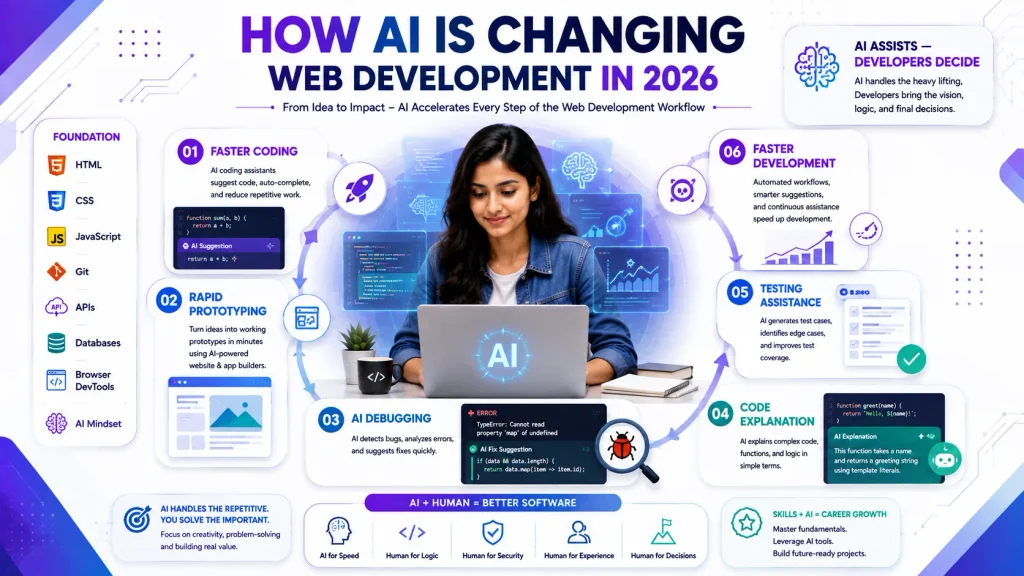
AI web development tools are mainly changing web development by automating repetitive tasks, generating code, explaining errors, creating prototypes, and helping developers work through technical problems more quickly. The biggest changes can be seen in several areas:
- Faster coding: AI web development tools, including coding assistants, can suggest functions, components, and repetitive code.
- Rapid prototyping: AI web development tools can turn ideas into early application prototypes through prompt-based development.
- Faster debugging: AI web development tools can explain errors and suggest possible fixes, helping developers debug applications more efficiently.
- Code explanation: Beginners can use AI web development tools to explain unfamiliar syntax or programming concepts.
- Testing assistance: AI web development tools can help developers generate test cases and identify potential edge cases.
- Lower barrier to entry: People with limited coding experience can use AI web development tools to experiment with simple websites and applications.
However, AI-generated code still needs human review.
A developer must understand whether the solution is secure, scalable, maintainable, accessible, and appropriate for the actual business requirement. With AI web development tools, the role of the developer is shifting from simply writing code toward understanding problems, directing AI, reviewing output, integrating systems, and making technical decisions.
Is Web Development Dead in 2026?
No, web development is not dead in 2026. What is changing is the amount of manual work involved in building software. AI web development tools is making it easier to assist or automate simple and repetitive coding tasks. At the same time, developers still need to understand how applications work and how different technologies fit together. For beginners, this creates both a challenge and an opportunity. The challenge is that producing basic code is becoming easier with AI.
The opportunity is that beginners who understand web fundamentals and know how to work effectively with AI web development tools can potentially become more productive and efficient.
So instead of asking:
“Will AI replace web developers?”
A more useful question is:
“Which web development skills become more valuable when AI handles repetitive coding?”
The answer includes problem-solving, application architecture, debugging, security, communication, user experience, and the ability to evaluate AI-generated solutions. In modern AI web development, these skills help developers use AI effectively while still maintaining control over the quality, security, and performance of their applications.
What Is Actually Changing in Web Development?
The biggest change is the shift from manual execution to AI-assisted development.
Traditionally, developers spent significant time searching documentation, writing repetitive code, debugging syntax errors, creating boilerplate, and building initial versions of applications.
AI can now assist with many of these tasks. But development still involves decisions such as:
- What should the application actually do?
- Which technology should be used?
- How should the application be structured?
- What data should be stored?
- How should authentication work?
- What security risks exist?
- How should the application scale?
- How should the user experience work?
- How should the final product be tested?
AI can provide suggestions, but developers remain responsible for evaluating those suggestions. This is why learning AI web development tools should complement technical fundamentals rather than replace them.
AI Web Development Tools
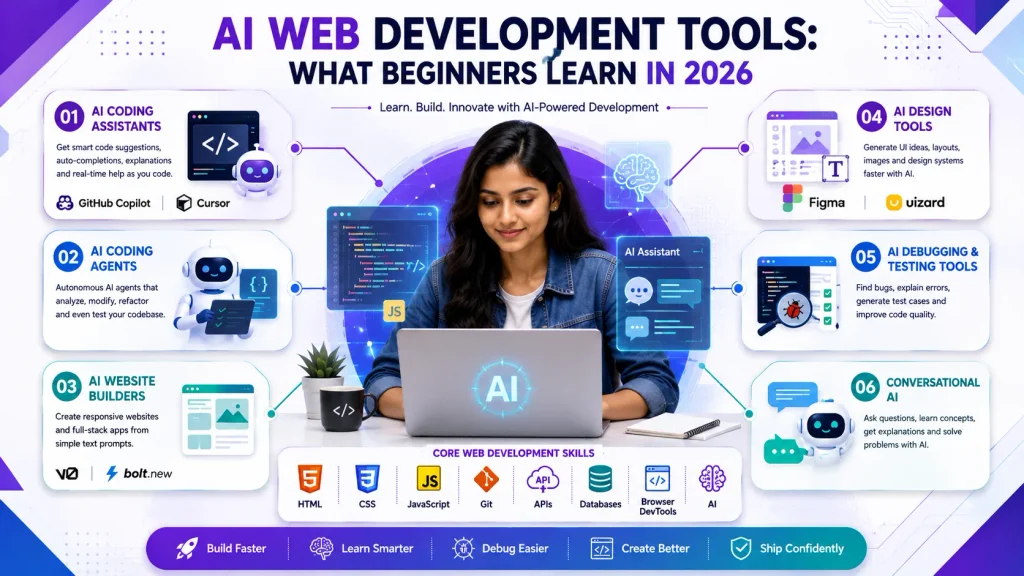
Not all AI web development tools perform the same job. Beginners should understand the major categories before choosing specific tools. Different tools can support coding, testing, design, prototyping, debugging, and other parts of the development workflow.
1. AI Coding Assistants
These tools work alongside developers inside coding environments and can suggest code, complete functions, explain existing code, and assist with debugging. Examples include:
- GitHub Copilot
- Cursor
- Other AI-powered coding assistants
They are particularly useful once you understand the programming language and development concepts you are working with.
2. AI Coding Agents
AI coding agents go beyond simple autocomplete. They can support developers through multiple steps of the development process. Depending on the tool and workflow, they can help with:
- Analyzing an existing codebase
- Creating or modifying files
- Implementing features
- Refactoring code
- Running tests
- Investigating errors
Beginners should use these tools carefully because more automation also means more responsibility for reviewing the resulting changes.
3. AI Website and App Builders
Tools such as v0 and Bolt can help turn natural-language descriptions into website or application prototypes. For example, instead of manually creating an initial interface, you might describe:
“Create a responsive landing page for a digital marketing academy with course cards, testimonials, and a contact section.”
The tool can generate an initial version that you can inspect, test, customize, and improve.
4. AI-Assisted Design Tools
AI can also help with:
- UI concepts
- Layout ideas
- Content structure
- Image generation
- Design variations
- Prototyping
However, understanding responsive design, typography, accessibility, visual hierarchy, and user experience remains important. These fundamentals help developers evaluate whether AI-generated designs actually provide a good experience for users.
5.AI Debugging and Testing Tools
AI can help developers understand errors, generate test cases, identify possible problems, and improve existing code. In modern AI web development, these tools can make debugging and testing faster by helping developers analyze code and find potential issues.
However, AI-generated tests should not automatically be considered complete. Developers working with AI web development tools still need to determine whether the tests cover important user scenarios, edge cases, security concerns, performance issues, and real-world requirements.
A developer must review AI-generated results before using them in a production project. This combination of AI assistance and human review helps improve code quality while keeping developers responsible for testing, security, and final quality decisions.
What Is the 30% Rule in AI?
The so-called 30% rule in AI web development should not be treated as a universally accepted technical rule. In many discussions, the idea is used as a simple framework for understanding the division between automated execution and human judgment. For web development, you can think about it this way:
AI is useful for execution. Humans remain responsible for direction and judgment.
AI can assist with:
- Boilerplate code
- Repetitive functions
- Documentation drafts
- Test generation
- Code explanations
- Initial prototypes
Developers still need to handle:
- Architecture
- Business requirements
- Security decisions
- System integration
- Code review
- Complex debugging
- User experience
- Final quality decisions
The exact percentage will vary by project, developer, technology, and AI tool. Therefore, beginners should not interpret the 30% rule as a fixed 70/30 division of work. Instead, in modern AI web development, it should be viewed as a reminder that automation does not eliminate the need for human oversight, technical knowledge, and informed decision-making.
Which AI Tool Is Best for Web Development?
There is no single best AI web development tool for every developer or project. The right tool depends on what you are trying to accomplish.
| Task | Useful AI Tool Category |
|---|---|
| Code completion | AI coding assistant |
| Understanding code | Conversational AI assistant |
| Rapid prototype | AI website/app builder |
| Refactoring | AI coding agent |
| Debugging | AI coding assistant or conversational AI |
| UI experimentation | AI design/prototyping tool |
| Learning concepts | Conversational AI |
For example, a beginner learning JavaScript may benefit more from an AI assistant that explains why a piece of code works than from a fully automated coding agent that writes an entire application. The goal should not be to find one tool that does everything. The goal is to build a workflow where AI helps you learn and work faster without removing your understanding of the technology.
Essential AI Tools and Skills Beginners Should Learn
If you are beginning web development in 2026, don’t try to learn every AI tool available. Start with a small and practical toolkit.
1. Learn One AI Coding Assistant
Choose one AI coding assistant and learn how to use it effectively in AI web development. Instead of depending on multiple tools, focus on understanding one assistant and how it can support your everyday development workflow.
Learn how to:
- Generate small pieces of code
- Explain existing code
- Suggest debugging approaches
- Refactor simple code
- Create basic test cases
- Improve code readability
- Review AI-generated output
The most important skill is learning not to accept AI suggestions automatically. In AI web development, AI-generated code should always be reviewed, tested, and understood before you add it to a project.
Check whether the suggested code is correct, secure, compatible with your existing application, and easy to maintain. If you do not understand the output, ask the AI to explain it step by step rather than simply copying and pasting it.
By developing a review-first approach, beginners can use AI web development tools and coding assistants to improve productivity while still building strong programming and problem-solving skills.
2. Learn Conversational AI for Learning
A conversational AI assistant can be useful for:
- Explaining JavaScript concepts
- Understanding error messages
- Comparing approaches
- Creating practice exercises
- Reviewing your reasoning
- Generating project ideas
The best use is often learning with AI, not simply asking AI to finish the assignment for you.
3. Learn Basic Prompt Writing
You don’t need complicated prompt engineering to use AI effectively.
Start by explaining:
- Your goal
- Your technology
- Your existing code
- The problem
- Your expected result
- Any restrictions
For example:
“I am building a responsive website using HTML and CSS. The navigation menu breaks on mobile screens. Explain why this happens and show me how to debug it rather than rewriting the entire website.” This type of prompt encourages understanding instead of blind copy-pasting.
4. Learn Git and Version Control
In AI web development, AI tools can modify multiple files and make significant changes to a project in a short time. That makes Git and version control even more important for beginners. Version control allows developers to track changes, compare different versions, experiment safely, and restore previous code when something goes wrong. Beginners should understand the following Git and version control concepts:
- Git repositories: Learn how project files and their development history are managed.
- Commits: Save meaningful changes with clear commit messages so you can understand what was changed and why.
- Branches: Create separate development branches to experiment with new features without affecting the main project.
- Pull requests: Learn how proposed changes can be reviewed before being merged into the main codebase.
- Reverting changes: Understand how to safely undo changes when an AI-generated or manually written solution creates problems.
- Reviewing differences: Compare changes line by line to identify exactly what has been added, removed, or modified.
This is particularly valuable when using AI coding assistants. Instead of blindly accepting large AI-generated changes, developers can review the differences, test the code, and revert unwanted modifications when necessary. Learning Git gives beginners greater control over their projects and makes AI web development safer, more organized, and easier to manage as applications become more complex.
5. Learn Browser DevTools
Browser DevTools remain essential even when AI writes the code. Learn how to use them for:
- Inspecting HTML
- Checking CSS
- Debugging JavaScript
- Monitoring network requests
- Testing responsive layouts
- Identifying performance issues
AI can suggest a solution, but DevTools lets you verify what is actually happening in the browser.
Why Web Development Fundamentals Still Matter
One of the biggest mistakes beginners make is assuming that AI means they can skip the fundamentals. It doesn’t. Before depending heavily on AI web development tools, beginners should understand:
HTML
Learn semantic structure, forms, links, images, headings, and accessibility basics.
CSS
Learn selectors, box model, Flexbox, Grid, responsive design, positioning, and basic animations.
JavaScript
Learn variables, functions, arrays, objects, conditions, loops, DOM manipulation, events, asynchronous JavaScript, and APIs.
Git
Learn how to track and manage changes.
APIs
Understand how frontend applications communicate with external services.
Databases
Learn the basic concepts of storing, retrieving, updating, and managing data.
Security
Understand fundamentals such as authentication, authorization, input validation, and common web vulnerabilities.
These skills allow you to evaluate whether AI-generated code actually makes sense.
Skills AI Cannot Reliably Replace
AI can generate impressive code, but AI web development involves much more than code generation. Building reliable websites and applications requires technical knowledge, critical thinking, business understanding, security awareness, and human judgment. Several skills still require significant context and decision-making that AI cannot reliably handle on its own.
System Architecture
Someone needs to decide how different components of an application should interact, how data should flow between systems, and how the application should scale as users and requirements increase.
AI web development tools can suggest architectural patterns or generate parts of an implementation, but developers still need to evaluate whether a particular architecture is suitable for the project’s goals, budget, performance requirements, and future growth.
Business Requirement Analysis
Clients rarely provide perfectly structured technical requirements. Developers need to understand business goals, identify missing information, ask the right questions, and turn those requirements into practical technical solutions.
In AI web development, AI can help organize requirements or suggest possible features, but understanding the actual business context still requires human judgment. A technically correct solution may still fail if it does not solve the client’s real problem.
Security Judgment
AI-generated code can contain vulnerabilities, insecure configurations, or inappropriate assumptions. Developers using AI web development tools need to review authentication, authorization, data handling, input validation, API security, and other potential risks.
Security decisions require careful analysis of the application’s environment and users. Therefore, developers should never assume that AI-generated code is automatically secure simply because it works correctly.
User Experience
Creating a technically functional website does not automatically create a good user experience. Developers and designers need to understand user needs, accessibility, navigation, visual hierarchy, performance, and conversion goals.
AI can provide design suggestions, layouts, and interface ideas, but humans still need to determine whether the final experience is useful, intuitive, accessible, and appropriate for the target audience.
Communication
Developers must communicate with clients, designers, marketers, managers, and other developers. This requires understanding context, explaining technical concepts clearly, asking questions, handling feedback, and making decisions collaboratively.
As AI web development continues to evolve, communication remains an important skill because successful projects depend not only on writing code but also on understanding people, requirements, priorities, and business objectives.
Critical Thinking and Decision-Making
Developers also need to evaluate different solutions and decide which approach is most appropriate. AI web development tools can generate several possible answers, but choosing the right one requires knowledge of the project’s constraints and long-term objectives.
For this reason, beginners should focus on developing strong fundamentals alongside AI skills. The most valuable developers will not simply be those who can generate code quickly using AI web development tools, but those who can understand problems, evaluate solutions, make informed decisions, and take responsibility for the final result.
How to Learn Web Development in an AI-Assisted World
Learning AI web development effectively requires a balance between strong technical fundamentals and practical experience with AI tools. Beginners should first understand how websites and applications work independently and then introduce AI gradually into their development workflow.
Step 1: Learn HTML and CSS
Start by learning HTML and CSS and build simple websites without depending heavily on AI. Understand page structure, semantic HTML, CSS layouts, responsive design, spacing, typography, and basic accessibility. The goal is to understand how a website is structured before asking AI to generate complete pages for you.
Step 2: Learn JavaScript
Next, learn JavaScript and understand the programming logic behind interactive websites. Focus on variables, functions, conditions, loops, arrays, objects, DOM manipulation, events, and asynchronous programming. These fundamentals will help you understand and evaluate code generated by AI web development tools more effectively.
Step 3: Build Small Projects
Practice by creating small projects that allow you to apply what you have learned. Examples include:
- Portfolio website
- To-do application
- Calculator
- Weather interface
- Landing page
- Simple API-based application
Try building at least some parts of these projects yourself before using AI assistance. This develops the independent problem-solving skills needed for modern AI web development.
Step 4: Introduce AI Assistance
Once you understand the basics, gradually introduce AI web development tools into your workflow. Use AI tools to support your learning and development rather than allowing them to replace your understanding. You can use AI to:
- Explain errors
- Suggest improvements
- Generate repetitive code
- Review your approach
- Create test cases
- Explain unfamiliar programming concepts
- Suggest alternative solutions
The objective is to learn how AI can improve productivity while keeping yourself responsible for the final result.
Step 5: Review Everything
Before using AI-generated code, develop the habit of reviewing every important suggestion. Ask yourself:
- What does this code do?
- Why does it work?
- Is it secure?
- Is it accessible?
- Is it efficient?
- Can I explain it in an interview?
- Does it fit the existing project?
- Have I tested it properly?
This review process is an essential part of AI web development because generated code can contain errors, unnecessary complexity, outdated practices, or security issues.
Step 6: Build Larger Projects
After completing smaller projects, gradually move toward more complex applications involving APIs, databases, authentication, responsive interfaces, and deployment. At this stage, AI web development tools can help with repetitive development tasks, debugging, documentation, testing, and code improvement. However, you should continue making the important architectural and technical decisions yourself.
Step 7: Practice Without AI
Occasionally solve programming problems and build small features without AI web development tools. This helps maintain independent problem-solving skills and ensures that you can still write, understand, and debug code when an AI tool is unavailable.
The best approach is not to avoid AI completely or depend on it for everything. Instead, learn the fundamentals first, use AI strategically, and continuously improve your ability to evaluate its output. This balanced approach can help beginners become confident developers in an increasingly AI web development focused industry.
Common Mistakes Beginners Make With AI Tools
1. Skipping Fundamentals
Generating a complete website with AI doesn’t mean you understand how the website works.
2. Copying Code Without Understanding It
If you cannot explain the code, you are not really learning from it.
3. Trusting AI Blindly
AI-generated code can be incorrect, inefficient, outdated, or insecure.
4. Using Too Many Tools
Trying ten AI coding tools at once can create confusion.
Start with one or two tools and learn them properly.
5. Avoiding AI Completely
Ignoring AI tools altogether can also be a mistake because AI-assisted workflows are becoming increasingly common.
6. Building Only Tutorial Projects
AI makes it easy to generate polished-looking projects using AI web development tools. Instead, build projects that solve actual problems and require you to make technical decisions. For related learning resources, see our guides on Top AI Tools for Web Development and Website Development Course Career Guide.
A Practical AI Web Development Learning Approach
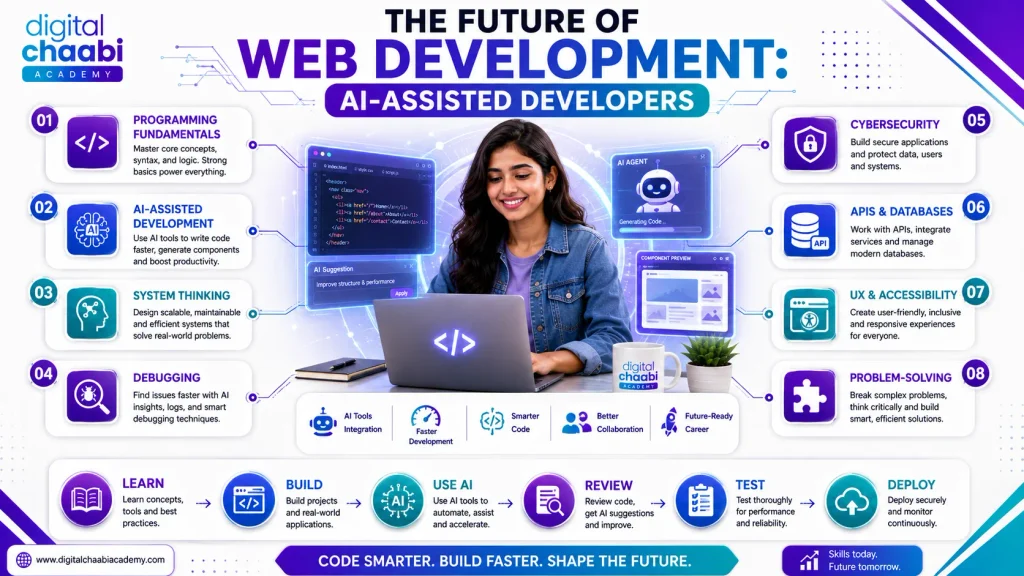
A balanced learning path can look like this:
Phase 1 — Fundamentals
Learn HTML, CSS, JavaScript, Git, browser DevTools, and basic web concepts.
Phase 2 — Manual Projects
Build small projects without relying heavily on AI.
Phase 3 — AI Assistance
Introduce an AI coding assistant and use it for explanations, debugging, repetitive work, and code reviews.
Phase 4 — Advanced Development
Learn APIs, databases, authentication, frameworks, testing, deployment, and security.
Phase 5 — AI-Assisted Projects
Use AI web development tools throughout the development workflow while maintaining responsibility for architecture, testing, security, and final decisions.
This approach helps you become an AI-assisted developer rather than an AI-dependent developer.
Digital Chaabi Academy’s Approach to AI Web Development
At Digital Chaabi Academy, we believe beginners should learn AI alongside web development fundamentals rather than use AI as a shortcut around them. Students first need to understand concepts such as HTML, CSS, JavaScript, responsive design, and programming logic. Once those fundamentals are clear, AI tools become much more useful. Students can then use AI to:
- Explore alternative solutions
- Understand errors
- Speed up repetitive development
- Generate practice exercises
- Review code
- Experiment with new ideas
The objective is simple:
Learn the technology first. Then learn how AI can help you use that technology more effectively.
This approach is especially valuable when preparing for interviews, internships, freelance projects, and real client work.
Future of Web Development Careers
The future of AI web development is likely to involve a much closer relationship between developers and AI tools. AI will continue assisting with coding, testing, documentation, prototyping, and other repetitive development activities. However, this does not mean every developer will have the same role in the future.
The skills that become increasingly valuable include:
- Strong programming fundamentals
- AI-assisted development
- System thinking
- Debugging and testing
- Security awareness
- API and database knowledge
- User experience
- Communication
- Problem-solving
- Ability to evaluate AI-generated output
In other words, the definition of a good developer is changing. The future developer may spend less time typing repetitive code and more time deciding what should be built, validating AI-generated solutions, integrating systems, and solving difficult problems.
As AI web development continues to evolve, developers who combine strong technical fundamentals with AI web development tools and AI skills will be better prepared for the changing demands of the industry.
FAQs
How is AI changing web development?
AI is changing web development by assisting with coding, debugging, testing, documentation, prototyping, and repetitive development tasks. Developers still need to handle architecture, security, business requirements, and quality decisions.
What are AI web development tools?
AI web development tools are software applications that use artificial intelligence to assist with tasks such as code generation, code completion, debugging, testing, prototyping, design, and website creation.
What are the best AI web development tools for beginners?
Beginners should start with one AI coding assistant, a conversational AI tool, Git, and browser DevTools. These are useful AI web development tools for learning, coding, debugging, and rapid experimentation. AI website builders can also be useful for testing ideas and creating prototypes quickly.
Is web development dead in 2026?
No. AI is changing how web development is performed, especially by automating repetitive work. However, developers still need programming knowledge, system understanding, security awareness, problem-solving, and communication skills.
What is the 30% rule in AI?
The 30% rule in AI web development is better understood as an informal framework rather than a universal technical standard. It is sometimes used to describe the idea that AI web development tools can automate a significant amount of execution work, while humans remain responsible for judgment, validation, decision-making, and oversight.
Should beginners learn coding if AI can write code?
Yes. Coding fundamentals remain important because developers need to understand, evaluate, debug, modify, secure, and maintain AI-generated code when working with AI web development tools.
Will AI replace web developers who use AI web development tools?
AI is likely to automate more development tasks, but that is different from completely eliminating the need for developers. Developers who combine technical fundamentals with AI web development tools may be better positioned for AI-assisted workflows and evolving development practices.
Should I learn AI web development tools before learning web development?
No. Start with web development fundamentals and introduce AI web development tools as learning and productivity assistants. This makes it easier to understand whether AI-generated solutions are correct and how they fit into real-world development workflows.
Conclusion
AI web development tools are transforming how websites and applications are created, but they are not a replacement for understanding web development. For beginners, the smartest approach is not to choose between coding and AI.
Learn both. Start with HTML, CSS, JavaScript, Git, APIs, browser Dev Tools, and fundamental programming concepts. Then learn how AI coding assistants, builders, and other AI tools can make your workflow faster. The goal should be to become an AI-assisted web developer who understands the technology, not someone who simply copies AI-generated code. As AI continues to evolve, strong fundamentals, critical thinking, problem-solving, and the ability to work effectively with AI will remain valuable skills.
Ready to Learn Web Development With AI?
If you want to learn web development in a way that combines strong fundamentals with practical AI tools, explore the web development training at Digital Chaabi Academy. Build real projects, strengthen your technical foundation, and learn how to use AI as a productivity tool rather than a replacement for learning.